Intro

Open Source since day 1:

Kusama Shield is a set of autonomous smart contracts providing immutable privacy for assets on the Polkadot and Kusama networks. Deployed on Paseo testnet and both Polkadot AssetHub and Kusama AssetHub mainnets, it utilizes Snowbridge — the trustless bridge between Polkadot and Ethereum — for cross-chain interoperability.
Kusama Shield remains Open Source Since day 1, developed under the MIT license.
Recommended wallet:
Kusama Shield supports 200+ EVM wallets via Reown AppKit (MetaMask, Rabby, Coinbase Wallet, Trust Wallet, WalletConnect, and more) plus Polkadot-native wallets via @talismn/connect-wallets (Talisman, Nova, SubWallet, Polkadot.js, PolkaGate, Fearless, Enkrypt, and more).
All current features have been tested with Talisman.
SDKs
TypeScript/JavaScript:
npm install @kusamashield/shielded-transfers@0.1.4
Python:
pip install shielded-transfers
Uses light-poseidon-python (Rust backend, 2x faster than Node.js) for Poseidon hashing.
See Integrate via the SDK for full usage guides.
Code repositories:
https://codeberg.org/KusamaShield/
- Interface Kusama Shield React interface.
- Solidity helpers Solidity contracts and EVM helper scripts.
- shielded-transfers SDK TypeScript SDK for shielded deposits and withdrawals (v0.1.4).
- PoseidonPolkaVM The fastest on-chain Poseidon implementation in the world — Rust compiled to PolkaVM, 17.7x cheaper gas than Solidity.
- ZKSOLgen ZK solidity verifier generator.
Source code mirrors:
Live instance:
https://kusamashield.laissez-faire.trade
How does Kusama Shield work?
Kusama Shield is a Zero Knowledge powered multi-asset shielded pool, allowing anyone to deposit any supported token into the shielded pool and withdraw without a link inbetween, providing unlinkable transactions.
The project runs as autonomous EVM-compatible smart contracts on Kusama and Polkadot AssetHub, powered by RISC-V PVM.
Shielded Send
The Send tab lets you pay any invoice privately. Your funds pass through the V7 shielded pool, breaking the on-chain link between sender and recipient:
Your Wallet ── deposit ──▶ Shield Pool (V7) ── ZK proof ──▶ withdraw ──▶ Recipient
Two modes:
- DOT → DOT: Send DOT/PAS directly to any address with full unlinkability
- DOT → ANY: Deposit DOT, receive BTC/ETH/SOL or any of 70+ currencies at the destination
See Shielded Send for full details.
V7 Shielded Pool
The V7 pool is the current version deployed on Paseo testnet and Polkadot mainnet:
| Feature | Description |
|---|---|
| 8 Public Signals | Stronger privacy guarantees |
| Linkability Fix | No deposits[] mapping — deposits and withdrawals are unlinkable |
| Known-Roots Window | 16 recent roots accepted, preventing griefing |
| Proxy Withdrawals | Route through proxy contract for extra unlinkability |
See V7 Shielded Pool for the full specification.
Smart contract architecture:
Kusama Shield consists of 3 main contracts that interact with each other. For a more detailed view read the Zero Knowledge Circuit section here on the documentation page.
View source: https://codeberg.org/KusamaShield/Solidity_helpers
How anonymous is the system?
Kusama Shield provides unlinkable transactions. The privacy score can be measured by the K-anonymity score — displayed in the Privacy Dashboard. The more users that deposit and withdraw at the same time, the higher the anonymity. The goal is to get lost in the crowd.
How does it compare to Monero?
Monero relies on decoy transactions. To calculate the anonymity score of your Monero transaction we need to look at a block explorer, and calculate
\( k = \frac{\text{Total number of decoys in the block}}{\text{Total number of transactions in the block}} \)
Supported assets
Kusama Shield supports all ethereum erc20 asset as well as the native token on the chain where it is deployed.
Supported Networks
- Paseo Assethub | Testnet
- Polkadot Assethub | Mainnet
- Kusama Assethub | Mainnet
For the latest features and most stable version use the Paseo testnet version. Mainnet deployments (Polkadot and Kusama) support the full V7 feature set including shielded send and proxy withdrawals.
Westend and Moonbase are not actively maintained and should not be used.
V7 Deployments
| Network | Pool | Chain ID | Status |
|---|---|---|---|
| Paseo | 0xbcE09D4De052b2816df1285663ac89528DF45380 | 420420417 | Testnet, V7 |
| Polkadot | 0x0D694Da746e73D1e255c1894F90e38170db45809 | 420420419 | Mainnet, V7 |
| Kusama | 0x625159459EB6C50C4F4b126A955B18d5c4DCA573 | 420420418 | Mainnet |
Kusama Shield is compatible with any EVM chain that supports smart contracts in Solidity and has an Ethereum RPC.
RPC Endpoints
| Network | HTTP (EVM) |
|---|---|
| Polkadot AH | https://polkadot-assethub-rpc.laissez-faire.trade |
| Paseo AH | https://paseo-assethub-rpc.laissez-faire.trade |
| Kusama AH | https://kusama-rpc.laissez-faire.trade |
Paseo Assethub Testnet
Paseo Assethub is the Polkadot testnet. A stable testnet for Kusama and Polkadot ecosystem development.
V7 Contract Addresses
| Contract | Address |
|---|---|
| Shield Pool V7 | 0xbcE09D4De052b2816df1285663ac89528DF45380 |
| ZK Verifier | 0xcA4cBc5d31eccd08d393C43aF492F729FF30b685 |
| Poseidon Hasher | 0x1d165f6fE5A30422E0E2140e91C8A9B800380637 |
| Deployment Block | 11273491 |
Configure MetaMask

| Field | Value |
|---|---|
| Network Name | Paseo AssetHub |
| RPC URL | https://paseo-assethub-rpc.laissez-faire.trade |
| Chain ID | 420420417 |
| Currency Symbol | PAS |
| Block Explorer | https://testnet.routescan.io/ |
Get testnet tokens via Faucet:
Ethereum RPC:
https://paseo-assethub-rpc.laissez-faire.tradehttps://eth-rpc-testnet.polkadot.io/
WSS Endpoint:
wss://asset-hub-paseo-rpc.n.dwellir.com
Block explorers:
Native Asset:
PAS
Chain id:
420420417
Deployed contract source code:
codeberg.org/KusamaShield/Solidity_helpers/contracts/paseo_assethub
Gas Units
| Operation | Gas Limit |
|---|---|
| Shield (deposit) | 20,000 |
| Unshield (withdraw) | 40,000 |
Kusama Shield Paseo demo:
Read more about Paseo here:
Paseo.site https://docs.polkadot.com/parachains/launch-a-parachain/deploy-to-polkadot/#get-started-with-an-account-and-tokens https://github.com/paseo-network
Polkadot Assethub Mainnet
Polkadot AssetHub is the primary mainnet deployment of the Kusama Shield V7 pool. It uses the Polkadot relay chain for security and DOT as the native token.
Network Details
| Parameter | Value |
|---|---|
| Network | Polkadot AssetHub |
| Chain ID | 420420419 |
| Native Token | DOT |
| Decimals | 10 |
| Status | Mainnet, active |
V7 Contract Addresses
| Contract | Address |
|---|---|
| Shield Pool V7 | 0x0D694Da746e73D1e255c1894F90e38170db45809 |
| ZK Verifier | 0x6A13781E43AEA21918120CD0E7a2ed8614c01e14 |
| Poseidon Hasher | 0xB8F0C6679D6Cc56450470522Bd96573C3D615052 |
| Deployment Block | 18460000 |
Note: The old Polkadot pool (
0x6f54d64C...) used a Poseidon hasher with different round constants (bn254_x5) that did not match the ZK circuit. Deposits in the old pool cannot be withdrawn. The current hasher at0xB8F0C66...uses circomlibjs-compatible constants.
RPC Endpoints
| Type | URL |
|---|---|
| HTTP (EVM) | https://polkadot-assethub-rpc.laissez-faire.trade |
| HTTP (EVM) | https://eth-rpc.polkadot.io/ |
| WSS (Substrate) | wss://asset-hub-polkadot-rpc.polkadot.io |
Use the laissez-faire.trade endpoint for lower rate-limiting. The polkadot.io endpoint may throttle
eth_getLogscalls used for Merkle tree building.
Block Explorer
https://blockscout.polkadot.io/
Configure MetaMask
| Field | Value |
|---|---|
| Network Name | Polkadot AssetHub |
| RPC URL | https://polkadot-assethub-rpc.laissez-faire.trade |
| Chain ID | 420420419 |
| Currency Symbol | DOT |
| Block Explorer | https://blockscout.polkadot.io/ |
Configure Talisman
Talisman natively supports Polkadot AssetHub. Select it from the network dropdown — no manual configuration needed.
How to Fund Your EVM Account
Polkadot AssetHub uses the standard EVM→Substrate address mapping:
AccountId32 = H160 + 12 × 0xEE
To send DOT from your Substrate (SS58) account to your EVM address:
- Derive the H160 fallback:
keccak256(sr25519_pubkey).slice(-20) - Use app.turtle.cool or any XCM tool to transfer DOT from Polkadot relay chain to AssetHub
- Send from your SS58 account to the H160 address padded with
0xEEbytes
Gas Notes
| Parameter | Typical Value |
|---|---|
| Gas price | 200-800 gwei |
| Deposit gas | ~45,000 units |
| Withdraw gas | ~7,000 units |
Polkadot AssetHub can have higher and more variable gas prices than testnets. Use maxFeePerGas (EIP-1559) for gas pricing — not gasPrice.
Supported Features
- ✅ V7 shielded deposits and withdrawals
- ✅ Shielded Send (DOT→DOT and DOT→ANY)
- ✅ Bridge & Swap (DOT→KSM via on-chain DEX + Snowbridge)
- ✅ Proxy withdrawals
- ✅ Pallet asset shielding (USDC, USDT, and other Substrate assets)
- ✅ Privacy Dashboard with pool scanner
Getting DOT
DOT must be purchased on an exchange and transferred to Polkadot AssetHub. There is no faucet for mainnet.
Kusama Assethub Mainnet
Deployed Contracts
| Contract | Address |
|---|---|
| Shield Pool | 0x625159459EB6C50C4F4b126A955B18d5c4DCA573 |
| ZK Verifier | 0x66988131CFfd10d2804ffaC93Ac302D0886D7829 |
| Chain ID | 420420418 |
| Deployment Block | 0 |
Network Details
| Parameter | Value |
|---|---|
| Network | Kusama AssetHub |
| Chain ID | 420420418 |
| Native Token | KSM |
| Decimals | 12 |
| Status | Mainnet |
Kusama Assethub EVM RPCs:
https://kusama-rpc.laissez-faire.tradehttps://kusama-asset-hub-eth-rpc.polkadot.iohttps://eth-asset-hub-kusama.dotters.network
Block Explorer
https://blockscout-kusama.polkadot.io/
How to fund an EVM account on Kusama Assethub.
XCM tokens from Kusama to Kusama Assethub:
app.turtle.cool is an easy to use tool to send your KSM from Kusama to Kusama Assethub.
Account conversion:
When we make transactions we are doing this from an ethereum account in an ethereum way, in order to do so we must send funds from our regular substrate address to the EVM address we want to use.
Let’s create a new ethereum account and send funds to it:
 cast wallet new
Successfully created new keypair.
Address:     0xbe386C4368Fadf622830d00e2353D4dF5fEE52Ac
Private key: 0x45f3cb7cd86153b09b83c914c9306161e790738295a209334f35127d45897639
Take the Address and append 24 small e:
0xbe386C4368Fadf622830d00e2353D4dF5fEE52Aceeeeeeeeeeeeeeeeeeeeeeee
send a balance transfer to this account like this: https://assethub-kusama.subscan.io/extrinsic/10684721-2
How to use Kusama Shield on Kusama Assethub:
Note: make sure you have balance on your ETHEREUM account on Kusama Assethub
1: Connect wallet:

2: Select Amount

3: Save token
Next you will have a secret token being generated for you, when you want to withdraw you need to know the amount and this secret token.
Redeploying the shielded pool:
- 1: Deploy the PolkaVM poseidon project
- 2: deploy the zk verifier
- 3: Link the poseidon contract into InternalLeanIMT
- 4: Link the zk contract address into the FixedIlop/Shielded Pool contract
- 5: Deploy the Shielded pool with the script provided in same repo
- 6: Test withdrawals and deposits with this script:
https://codeberg.org/KusamaShield/Solidity_helpers/src/branch/main/contracts/paseo2_kusama/test_deposit_withdraw.js
Westend Assethub
Note: Westend Assethub is currently bricked, use the Paseo chain instead
Faucet:
https://faucet.polkadot.io/westend?parachain=1000
Block explorer:
https://blockscout-asset-hub.parity-chains-scw.parity.io
Moonbase Testnet (deprecated)
Moonbase is no longer actively maintained and should not be used.
Zero Knowledge Circuits
The ZK logic uses a LeanIMT merkle tree, as its one of the few audited merkle tree’s recommended by ZK-kit.
All circuits are written in Circom, if you are new to circom, we recommend you go throw this tutorials: https://learn.0xparc.org/materials/circom/learning-group-1/intro-zkp/
Source code:
https://codeberg.org/KusamaShield/Solidity_helpers/src/branch/main/contracts/new_circuits
V7 Circuit (Current)
The V7 circuit is a ZK-SNARK circuit built with Circom 2.1 and Groth16 on BN254. It enables private withdrawals from an on-chain commitment pool with 8 public signals and a linkability fix — no deposits[] mapping means deposits and withdrawals cannot be correlated on-chain.
V7 Improvements Over Previous Versions
| Feature | Description |
|---|---|
| 8 public signals | newCommitmentHash, existingNullifierHash, contextHash, withdrawnValue, treeDepth, context, root, asset |
| Linkability fix | No deposits[] mapping — nullifierHash not exposed at deposit time |
| Known-roots window | 16-slot recent-roots window on-chain |
| Leaner events | Deposit(address,bytes32) — only asset and commitment |
V7 Commitment Derivation
nullifier     = poseidon2([secret, 1])
nullifierHash = poseidon1([nullifier])
precommitment = poseidon2([nullifier, secret])
valueAsset    = poseidon2([amountWei, assetId])
commitment    = poseidon2([valueAsset, precommitment])
poseidon1is a single-input Poseidon — NOTposeidon2(nullifier, 0). Using the wrong function produces mismatched nullifierHash and fails on-chain.
V7 Public Signals
| Index | Signal | Purpose |
|---|---|---|
[0] | newCommitmentHash | Change commitment inserted into tree |
[1] | existingNullifierHash | Marks the spent commitment (double-spend prevention) |
[2] | contextHash | Replay protection |
[3] | withdrawnValue | Amount being withdrawn |
[4] | treeDepth | Fixed at 128 |
[5] | context | Chain-specific binding |
[6] | root | Merkle tree root |
[7] | asset | Asset precompile address (0 for native) |
V7 Event Format
event Deposit(address indexed asset, bytes32 commitment);
Only the asset address and commitment are emitted. The nullifierHash is never exposed — it is only revealed in the withdrawal proof’s public signals. This prevents linking deposits to withdrawals.
Context Hash
contextHash = keccak256(abi.encodePacked(senderAddress)) % BN254_R
Where BN254_R = 21888242871839275222246405745257275088548364400416034343698204186575808495617.
Circuit Architecture (V7)
withdraw.circom          ← top-level circuit (orchestrator)
├── commitment.circom    ← three-layer Poseidon commitment scheme
│   └── poseidon_bn254.circom  ← Poseidon hash wrapper (BN254)
└── merkle_tree.circom   ← LeanIMT variable-depth inclusion proof
    └── poseidon_bn254.circom
poseidon_bn254.circom — Hash Primitive
A parameterized wrapper around circomlib’s Poseidon hash. Poseidon is a ZK-friendly hash function — far cheaper inside an arithmetic circuit than SHA-256 or Keccak.
PoseidonBN254(n): signal input in[n] → signal output out
commitment.circom — Three-Layer Commitment
Constructs a commitment in three layers, each serving a distinct purpose:
| Layer | Computation | Purpose |
|---|---|---|
| 1 | nullifierHash = Poseidon(nullifier) | Published on-chain to prevent double-spending |
| 2 | precommitment = Poseidon(nullifier, secret) | Binds the nullifier to a secret only the owner knows |
| 3 | commitment = Poseidon(value, asset, precommitment) | The Merkle tree leaf, encoding value and asset type |
Separating the nullifier hash from the secret allows the nullifier to be revealed (marking a commitment as spent) without leaking the secret or the commitment’s position in the tree.
merkle_tree.circom — LeanIMT Inclusion Proof
Implements a Lean Incremental Merkle Tree inclusion proof with variable depth (up to maxDepth = 254).
At each tree level:
- The
leafIndexbits determine left/right child ordering. - If a sibling is zero (empty subtree), the node propagates unchanged — this is the “lean” optimization that avoids hashing against placeholder nodes.
- If a sibling is non-zero, the ordered pair is hashed with Poseidon.
The computed root is compared against the public root input. This approach is more constraint-efficient than a fixed-depth tree because most levels in a sparse tree have zero siblings.
withdraw.circom — Main Circuit
The top-level Withdraw template orchestrates the full proof:
| Step | Operation | Description |
|---|---|---|
| 1 | Compute existing commitment | Hashes through the three-layer scheme |
| 2 | Output nullifier hash | Published on-chain so the contract can reject double-spends |
| 3 | Merkle inclusion proof | Verifies the existing commitment is in the tree against the public root |
| 4 | Range checks | Constrains withdrawnValue to valid range |
| 5 | Nullifier uniqueness | Asserts existingNullifier != newNullifier |
| 6 | Compute new commitment | The “change” UTXO |
| 7 | Output new commitment | Inserted into the on-chain tree by the contract |
| 8 | Replay protection | Binds context into the proof |
Privacy Properties
- Sender privacy — the Merkle path is private, so the proof doesn’t reveal which commitment is being spent.
- Transaction unlinkability — each withdrawal creates a fresh commitment with a new nullifier and secret, preventing linkage of sequential transactions by the same user.
- Double-spend prevention — the nullifier hash is published on-chain; the contract rejects any previously-seen nullifier hash.
- Value integrity — range checks ensure no one can create value from nothing or withdraw more than they deposited.
- Replay protection — the
contextbinding prevents proof reuse across different chains or transactions.
V7 Shielded Pool
The V7 pool is the latest version of Kusama Shield’s zero-knowledge privacy pool, deployed on both Paseo testnet and Polkadot mainnet.
Shield (Deposit)

Unshield (Withdraw)

What’s New in V7
| Feature | Description |
|---|---|
| 8 Public Signals | Up from 7 in earlier versions — enables stronger privacy guarantees |
| Linkability Fix | No deposits[] mapping — deposits and withdrawals are fully unlinkable |
| Known-Roots Window | 16-slot recent-roots window prevents griefing attacks |
| Proxy Withdraw | Route withdrawals through a proxy contract for extra unlinkability |
| Leaner Events | Deposit(address,bytes32) — nullifierHash is never exposed at deposit time |
| Async Proofs | Background ZK proof generation with status polling |
Commitment Derivation (V7)
All hashing uses Poseidon over BN254, matching the ZK circuit exactly:
nullifier     = poseidon2([secret, 1])
nullifierHash = poseidon1([nullifier])
precommitment = poseidon2([nullifier, secret])
valueAsset    = poseidon2([amountWei, assetId])
commitment    = poseidon2([valueAsset, precommitment])
poseidon1is a single-input Poseidon hash. V7 uses it for nullifierHash — NOTposeidon2(nullifier, 0).
Withdrawal: 8 Public Signals
When the ZK proof is verified on-chain, the contract receives 8 public signals:
| Index | Signal | Purpose |
|---|---|---|
[0] | newCommitmentHash | Change commitment inserted into tree |
[1] | existingNullifierHash | Marks the spent commitment (prevents double-spend) |
[2] | contextHash | Replay protection (binds to chain/transaction) |
[3] | withdrawnValue | Amount being withdrawn |
[4] | treeDepth | Merkle tree depth (fixed at 128) |
[5] | context | Chain-specific context binding |
[6] | root | Merkle tree root the proof was generated against |
[7] | asset | Asset identifier (precompile address for pallet assets, 0 for native) |
Contract ABI (V7)
function depositNative(bytes32 commitment) external payable
function depositAsset(uint256 assetId, uint256 amount, bytes32 commitment) external
function depositAssetDirect(uint256 assetId, uint256 amount, bytes32 commitment) external
function withdraw(uint256[2] pA, uint256[2][2] pB, uint256[2] pC, uint[8] pubSignals, address recipient) external
function proxy_withdraw(uint256[2] pA, uint256[2][2] pB, uint256[2] pC, uint[8] pubSignals, address recipient) external
function currentRoot() external view returns (uint256)
function treeSize() external view returns (uint256)
function getEscrowBalance(address) external view returns (uint256)
function isNullifierSpent(bytes32) external view returns (bool)
function isKnownRoot(uint256) external view returns (bool)
function verifier() external view returns (address)
Proxy Withdrawals
The proxy_withdraw function routes the withdrawal through a separate proxy contract, giving the recipient a unique sender address each time.
Standard:   Pool ──────────────────▶ Recipient
            (pool address as sender)

Proxy:      Pool ──▶ Proxy Contract ──▶ Recipient
                     (fresh address as sender)
This adds a layer of unlinkability even if the recipient tries to trace the sender. Enable it via the Proxy Withdraw toggle on the Unshield tab.
Gas cost for proxy withdrawals is roughly 17x higher than standard withdrawals due to the extra contract deployment and forwarding logic.
Merkle Tree
V7 uses a LeanIMT (Lean Incremental Merkle Tree):
| Parameter | Value |
|---|---|
| Depth | 128 |
| Hash function | Poseidon (BN254) |
| Known-roots window | 16 slots |
| Event | Deposit(address,bytes32) |
| Unpaired nodes | Propagated unchanged (not hashed with self) |
The tree is synced from on-chain events by the backend proxy. A background monitor polls every 2 seconds for new deposits. The tree_update_lock ensures withdrawals wait for in-progress sync operations.
Root Mismatch Retry
If the local tree root doesn’t match the on-chain currentRoot(), the proxy will:
- Rebuild the tree from the deployment block (not just recent blocks)
- Retry up to 5 times
- If still mismatched, return an error
SS58 Address Forwarding
When a withdrawal targets a native SS58 (Substrate) address, the proxy performs a two-step process:
Pool ── withdraw ──▶ Account 1 (H160: 0x74e539fc...) ── transfer_keep_alive ──▶ SS58 destination
This is necessary because the pool only supports EVM (H160) recipients, but users want funds at their Substrate addresses.
Proof Generation
| Backend | Time | Used By |
|---|---|---|
| rapidsnark (C++) | ~4.3 seconds | Backend proxy |
| snarkjs (WASM) | ~15 seconds | Browser UI (client-side) |
The backend uses rapidsnark for production withdrawals. The browser falls back to snarkjs when generating proofs client-side (e.g., for the Unshield tab).
Circuit artifacts:
- WASM:
withdraw_phase2_fixed_v7.wasm - Proving key:
withdraw_phase2_fixed_v7_0001.zkey
Gas Costs (pallet-revive)
| Operation | Gas | USD (approx) |
|---|---|---|
| Deposit | ~45,000 | ~$0.19 |
| Withdraw (standard) | ~7,000 | ~$0.03 |
| Withdraw (proxy) | ~120,000 | ~$0.50 |
Gas costs on pallet-revive are ~270x cheaper than equivalent operations on Ethereum mainnet.
Deployed Contracts
Polkadot AssetHub (Mainnet)
| Contract | Address |
|---|---|
| Pool V7 | 0x0D694Da746e73D1e255c1894F90e38170db45809 |
| Verifier | 0x6A13781E43AEA21918120CD0E7a2ed8614c01e14 |
| Poseidon | 0xB8F0C6679D6Cc56450470522Bd96573C3D615052 |
| Chain ID | 420420419 |
| Deployment Block | 18460000 |
Paseo AssetHub (Testnet)
| Contract | Address |
|---|---|
| Pool V7 | 0xbcE09D4De052b2816df1285663ac89528DF45380 |
| Verifier | 0xcA4cBc5d31eccd08d393C43aF492F729FF30b685 |
| Poseidon | 0x1d165f6fE5A30422E0E2140e91C8A9B800380637 |
| Chain ID | 420420417 |
| Deployment Block | 11273491 |
Event Format
event Deposit(address indexed asset, bytes32 commitment);
Only the asset address and commitment hash are emitted. The nullifierHash is never exposed during deposit — it is only revealed when the deposit is spent (in the ZK proof’s public signals).
Context Hash
Every withdrawal binds to a context hash for replay protection:
contextHash = keccak256(abi.encodePacked(senderAddress)) % BN254_R
Where BN254_R = 21888242871839275222246405745257275088548364400416034343698204186575808495617.
This ensures a proof generated for one chain or sender cannot be replayed elsewhere.
Source Code
- Pool contract: FixedIlopPhase2Paseo_v7.sol
- Circuit:
withdraw_phase2_fixed_v7.circom - Verifier: VerifierPhase2_Fixed_v7.sol
Shielded Send
The Send tab lets you pay any invoice privately — funds pass through the V7 shielded pool, breaking the on-chain link between you and the recipient.
How It Works
Your Wallet ── deposit (commitment) ──▶ Shield Pool (V7)
                                           │
              ZK proof ──▶ Proxy ──▶ withdraw ──▶ Recipient
- Your wallet deposits funds into the V7 pool with a cryptographic commitment
- The proxy generates a Groth16 ZK proof proving you own a valid deposit — without revealing which one
- The proxy withdraws to your recipient’s address
- The recipient receives the funds with no on-chain link back to you
Two Transfer Modes
DOT → DOT (Same-Token Transfer)
Send DOT/PAS directly to any address on the same network.
- Enter the amount and recipient address
- Supports both H160 (
0x...) and SS58 (Substrate) addresses - SS58 addresses are automatically forwarded via Substrate transfer
- Gas fee estimate displayed before confirming
DOT → ANY (Cross-Currency Transfer)
Send DOT from the pool and receive BTC, ETH, SOL, or any of 70+ supported currencies at the destination.
- Enter amount, select destination currency, enter recipient address
- View the live exchange rate: “1 DOT ≈ X BTC”
- Confirm — your deposit goes into the V7 pool
- The proxy withdraws to a swap-generated deposit address
- The swap provider completes the conversion to your destination currency
Note: The Send tab is available on mainnet only. Testnet selections will show it as disabled.
Async Withdrawal Flow
Because ZK proof generation takes time (~4 seconds with rapidsnark, ~15 seconds with snarkjs), withdrawals are asynchronous:
| Stage | What Happens |
|---|---|
| Depositing | Your wallet submits the depositNative transaction |
| Building Tree | Proxy syncs the Merkle tree from recent blocks |
| Generating Proof | Proxy produces the Groth16 ZK proof |
| Withdrawing | Proxy submits the withdrawal transaction |
| Complete | Funds delivered to recipient |
The UI polls every 3 seconds for progress updates and displays a toast-driven progress indicator.
Proof generation takes ~4.3 seconds on the backend using rapidsnark (C++ prover).
Exchange Rate & Gas Estimation
- Live Rate: Fetched from the swap provider in real-time before you confirm
- Gas Estimate: Uses a real Poseidon commitment for accurate
estimateGas, so you know exactly what you’ll pay - Minimum Amounts: Swap minimums are enforced (e.g., 13.422 DOT for DOT→BTC)
Supported Address Formats
| Format | Example | Handling |
|---|---|---|
| H160 (EVM) | 0x13594E535099Aef344807fa8fE7aABe2a371b383 | Direct pool withdrawal |
| SS58 (EVM-derived) | 5GBb8s3oANu6BdbXn... | Auto-converted to H160 |
| SS58 (Native) | 16Ziip8mK44sh7uKFkZ... | Pool → H160 → Substrate forward |
| BTC / Other | bc1qxy2kgdygjrsqtz... | Routed through swap provider |
Native SS58 addresses go through a two-step forwarding process: the pool withdraws to an intermediate H160, then a Substrate transfer_keep_alive sends funds to the final SS58 destination.
API Endpoints
| Endpoint | Purpose |
|---|---|
POST /pool-withdraw | Initiate async withdrawal (returns withdraw_id) |
GET /pool-withdraw-status/<id> | Poll withdrawal progress |
POST /ff-create-order | Create swap order for cross-currency transfers |
POST /exchange_rate | Get live exchange rate between currencies |
POST /tree-rebuild/<network> | Rebuild Merkle tree from deployment block |
Required Setup
- Wallet: Google Chrome + Talisman (or any Polkadot/EVM wallet via Reown AppKit)
- Network: Mainnet only (Polkadot or Kusama AssetHub)
- Gas: Your wallet needs enough DOT/KSM for the deposit transaction; the proxy covers withdrawal gas
- SharedArrayBuffer: Required for multi-threaded ZK proofs in browser
Supported Wallets
Kusama Shield mainly supports EVM based browser wallets. Most features are tested with Talisman or Metamask wallet.
Polkadot / Substrate Wallets
Connected via @talismn/connect-wallets and @polkadot/extension-dapp.
| Wallet | Description |
|---|---|
| Polkadot.js | Official Polkadot browser extension |
| Talisman | Multi-chain wallet for Polkadot & Ethereum |
| SubWallet | Comprehensive Polkadot ecosystem wallet |
| Nova Wallet | Mobile-first Polkadot wallet |
| Fearless Wallet | DeFi wallet for the Polkadot ecosystem |
| PolkaGate | Polkadot browser extension wallet |
| Enkrypt | Multi-chain browser extension by MyEtherWallet |
| Manta Wallet | Privacy-focused wallet for Manta Network |
| Aleph Zero Wallet | Wallet for the Aleph Zero network |
EVM Wallets
| Wallet | Description |
|---|---|
| MetaMask | Most widely used Ethereum browser extension |
| Coinbase Wallet | Coinbase self-custody wallet |
| Trust Wallet | Multi-chain mobile wallet |
| Rainbow | Ethereum wallet with NFT support |
| Rabby | Rabby wallet |
| Zerion | DeFi-focused wallet |
| WalletConnect | QR-code-based protocol connecting 300+ mobile wallets |
Any wallet that supports the WalletConnect protocol can connect to this application. This is over 200 different EVM wallets.
Poseidon on PolkaVM
Poseidon is a cryptographic hash function designed specifically for zero-knowledge proof systems (like zk-SNARKs and zk-STARKs), where it needs to be efficient to compute inside arithmetic circuits. It works by processing input data through multiple rounds of substitution-permutation network (SPN) operations over a finite field, using only addition, multiplication, and power functions with small exponents (typically \(x^5\) or \(x^3\)).
Unlike traditional hash functions (SHA-256, Blake2) that use bitwise operations and modular arithmetic—operations expensive to represent in circuits—Poseidon’s arithmetic-friendly design minimizes the number of constraints needed in zk-proofs.
Core Structure
The hash consists of three main operations:
- AddRoundConstants — adding fixed field elements
- S-Boxes — applying the power function to a subset of state elements
- MixLayer — multiplying the state by an MDS matrix for diffusion
By carefully balancing full rounds (S-Boxes applied to all elements) with partial rounds (S-Boxes applied to just one element), Poseidon achieves both security and circuit efficiency, making it the go-to choice for hashing in modern blockchain scaling solutions and privacy protocols.
Poseidon White paper - POSEIDON: A New Hash Function for Zero-Knowledge Proof Systems
The solidity implementation was not working for PolkaVM and Kusama Assethub so we decided to port it to PolkaVM.
Deployed Hashers
| Network | Address | Constants |
|---|---|---|
| Paseo | 0x1d165f6fE5A30422E0E2140e91C8A9B800380637 | circomlibjs ✅ |
| Polkadot | 0xB8F0C6679D6Cc56450470522Bd96573C3D615052 | circomlibjs ✅ |
~~0x66988131CFfd10d2804ffaC93Ac302D0886D7829~~ | bn254_x5 ❌ (deprecated) |
The old Polkadot hasher (
0x66988131...) used bn254_x5 constants that did NOT match the ZK circuit. It was replaced by0xB8F0C66...which copies the Paseo hasher bytecode and uses circomlibjs-compatible constants.
light-poseidon-python (v0.1.5+)
Fast Python bindings for Poseidon hash using the Rust light-poseidon library:
pip install light-poseidon-python
from light_poseidon_python import poseidon_hash

result = poseidon_hash([12345, 67890])
# Returns: 11344094074881186137859743404234365978119253787583526441303892667757095072923
2x faster than Node.js circomlibjs with no external dependencies. Used by the backend proxy for Merkle tree building.
Code Examples
from light_poseidon_python import poseidon_hash, Hasher

# Simple two-input hash
result = poseidon_hash([12345, 67890])
# → 11344094074881186137859743404234365978119253787583526441303892667757095072923

# Reusable hasher (better performance for repeated calls)
hasher = Hasher(nr_inputs=2)
for i in range(100):
    result = hasher.hash([i, i + 1])

# Verify matches circomlibjs / on-chain
assert poseidon_hash([12345, 67890]) == 11344094074881186137859743404234365978119253787583526441303892667757095072923
print("Matches ZK circuit!")
pip install light-poseidon-python
The Rust-backed light-poseidon-python library is also the hashing backend for the Python SDK (shielded-transfers-python).
Performance: Rust vs Solidity on pallet-revive
| Implementation | Gas per hash | ref_time per hash | Block budget |
|---|---|---|---|
| Solidity Poseidon | 47,851 | ~1.01T ps | 70% of block |
| Rust PoseidonPolkaVM | 2,706 | ~36G ps | 2% of block |
17.7x cheaper gas, 28x faster computation. Solidity Poseidon is infeasible on pallet-revive — a single hash uses 70% of the block’s computational budget. The Rust PVM implementation makes Merkle tree operations fully feasible.
Repo:
https://codeberg.org/KusamaShield/PoseidonPolkaVM
Call the poseidon hasher on-chain:
cast call 0x1d165f6fE5A30422E0E2140e91C8A9B800380637 "hash(uint256[2]):(uint256)" "[123,456]" --rpc-url https://paseo-assethub-rpc.laissez-faire.trade
19620391833206800292073497099357851348339828238212863168390691880932172496143
Use:
Kusama Shield utilizes Poseidon in its on-chain merkle tree.
Compatibility:
PoseidonPolkaVM is compatible with:
- Circom https://github.com/iden3/circomlib/blob/master/circuits/poseidon.circom
- Light-Poseidon https://www.npmjs.com/package/poseidon-lite
- Solidity Example usecase: https://codeberg.org/KusamaShield/Solidity_helpers/src/branch/main/contracts/paseo/InternalLeanIMT.sol
Making it easy to integrate into your smart contract zk logic on Kusama Assethub.
How Poseidon Works in PoseidonPolkaVM
This document explains the Poseidon hash function as implemented in this repository — a PolkaVM-compatible, Solidity-friendly port built on the BN254 scalar field with Montgomery arithmetic.
Table of Contents
- Overview
- The BN254 Finite Field
- Montgomery Form Arithmetic
- The Poseidon Permutation
- Parameters
- Solidity / PolkaVM Interface
- Lean Indexed Merkle Tree
- Test Vectors
Overview
Poseidon is a cryptographic hash function designed specifically for zero-knowledge proof systems. Unlike general-purpose hash functions (SHA-256, Keccak), Poseidon operates natively over prime fields, making it extremely efficient inside arithmetic circuits (SNARKs, STARKs).
This implementation:
- Targets the BN254 scalar field (the same field used by Ethereum’s
ecPairingprecompile and Circom/Groth16). - Uses arity 2: it takes two field elements as input and produces one field element as output.
- Is fully compatible with CircomZK / Solidity Poseidon libraries (same constants, same outputs).
- Runs on PolkaVM (Polkadot’s RISC-V based virtual machine) as a smart contract.
Reference: Poseidon: A New Hash Function for Zero-Knowledge Proof Systems (2019)
The BN254 Finite Field
All arithmetic happens in the scalar field of the BN254 (alt_bn128) elliptic curve. This is the field of integers modulo the prime:
p = 21888242871839275222246405745257275088548364400416034343698204186575808495617
In hex:
p = 0x30644e72e131a029b85045b68181585d2833e84879b9709143e1f593f0000001
A field element is represented as four 64-bit limbs (little-endian):
#![allow(unused)]
fn main() {
#[derive(Clone, Copy, PartialEq, Eq)]
pub struct Fr([u64; 4]);  // 256-bit field element
}
All operations (addition, multiplication) produce results in the range [0, p-1].
Montgomery Form Arithmetic
Direct modular arithmetic requires expensive division for every reduction step. This implementation avoids that by using Montgomery form, where every field element a is stored as:
a_mont = a * R mod p where R = 2^256
Why Montgomery Form?
The key insight is that Montgomery multiplication computes:
MontMul(a_mont, b_mont) = a_mont * b_mont * R^(-1) mod p
                         = (a * R) * (b * R) * R^(-1) mod p
                         = a * b * R mod p
                         = (a * b)_mont
This replaces modular division with shifts and additions, which is much faster.
Key Constants
| Constant | Value | Purpose |
|---|---|---|
MODULUS | The prime p as 4 limbs | Field modulus |
INV | -p^(-1) mod 2^64 | Montgomery reduction factor |
R2 | R^2 mod p | Used to convert normal -> Montgomery form |
R_MOD_P | R mod p | Montgomery representation of 1 |
Conversion
- Normal to Montgomery:
a_mont = MontMul(a, R^2) = a * R^2 * R^(-1) = a * R mod p - Montgomery to Normal:
a = MontMul(a_mont, 1) = a_mont * 1 * R^(-1) = a * R * R^(-1) = a mod p
CIOS Multiplication Algorithm
The implementation uses the Coarsely Integrated Operand Scanning (CIOS) variant of Montgomery multiplication (src/zk.rs). For each limb i of the multiplier:
- Multiply-accumulate: Compute partial products
a[j] * b[i]and accumulate into a temporary buffert[0..5]. - Reduce: Compute
m = t[0] * INV mod 2^64, then addm * MODULUSto cancel out the lowest limb. - Shift: Move the result down by one limb position.
- Final subtraction: If the result exceeds
p, subtractponce.
Addition
Field addition computes a + b mod p using 128-bit additions with carry propagation, followed by a conditional subtraction of p if the result overflows.
The Poseidon Permutation
The Poseidon hash applies a sponge construction with a specialized permutation. Here is the complete flow:
State Initialization
The state is a vector of T = 3 field elements (state width = arity + 1):
state = [0, input[0], input[1]]
The first element (index 0) is the capacity element, initialized to zero. The remaining elements hold the inputs.
The Round Function
Each of the 65 rounds applies three layers in sequence:
┌──────────────────────────────────────────────────────────────────────┐
│  For each round r = 0..64:                                           │
│                                                                      │
│  1. ARK:  state[i] += ROUND_CONSTANTS[r * 3 + i]   for i in 0..3   │
│  2. SBOX: state[i]  = state[i]^5                    (full or partial)│
│  3. MDS:  state      = MDS_MATRIX * state                            │
│                                                                      │
└──────────────────────────────────────────────────────────────────────┘
Add Round Constants (ARK)
Each round adds a unique set of constants to the state. There are 195 round constants total (65 rounds x 3 state elements). These constants are generated deterministically using the Grain LFSR as specified in the Poseidon paper:
sage generate_parameters_grain.sage 1 0 254 3 8 57 <field_prime>
The constants are pre-computed and stored in Montgomery form in ROUND_CONSTANTS.
S-box Layer
The S-box is the non-linear component that provides cryptographic security. It computes x^5 (alpha = 5):
#![allow(unused)]
fn main() {
fn sbox(x: &Fr) -> Fr {
    let x2 = x.mul(x);       // x^2   (1 multiplication)
    let x4 = x2.mul(&x2);    // x^4   (1 multiplication)
    x4.mul(x)                 // x^5   (1 multiplication)
}
}
This is computed in 3 multiplications using the addition chain: 1 -> 2 -> 4 -> 5.
MDS Matrix Multiplication
The Maximum Distance Separable (MDS) matrix provides diffusion — it ensures that every input bit affects every output bit. The 3x3 MDS matrix multiplication is:
new_state[0] = MDS[0][0]*state[0] + MDS[0][1]*state[1] + MDS[0][2]*state[2]
new_state[1] = MDS[1][0]*state[0] + MDS[1][1]*state[1] + MDS[1][2]*state[2]
new_state[2] = MDS[2][0]*state[0] + MDS[2][1]*state[1] + MDS[2][2]*state[2]
The MDS matrix is a fixed, pre-computed constant derived from a Cauchy matrix, stored in Montgomery form. It is the same matrix used by the circomlib Poseidon implementation, ensuring output compatibility.
Full Rounds vs Partial Rounds
This is the key optimization of Poseidon over earlier designs:
Round 0  ─┐
Round 1   │  Full Rounds (first half: 4 rounds)
Round 2   │  → S-box applied to ALL 3 state elements
Round 3  ─┘
Round 4  ─┐
  ...      │  Partial Rounds (57 rounds)
  ...      │  → S-box applied ONLY to state[0]
Round 60 ─┘
Round 61 ─┐
Round 62  │  Full Rounds (second half: 4 rounds)
Round 63  │  → S-box applied to ALL 3 state elements
Round 64 ─┘
- Full rounds (8 total, split 4+4): Apply x^5 to every state element. This provides wide diffusion at the start and end.
- Partial rounds (57 total): Apply x^5 only to
state[0]. The MDS matrix still spreads the non-linearity to all elements.
This “sandwich” structure (full-partial-full) dramatically reduces the number of multiplications while maintaining the same security level. In arithmetic circuits (ZK proofs), this translates to far fewer constraints.
Output
After all 65 rounds, the hash output is state[0] — the capacity element:
#![allow(unused)]
fn main() {
pub fn poseidon(inputs: &[Fr; 2]) -> Fr {
    // ... 65 rounds of ARK + SBOX + MDS ...
    state[0]  // Return first element
}
}
Parameters
| Parameter | Value | Description |
|---|---|---|
| Field | BN254 scalar field | 254-bit prime field |
| Arity | 2 | Number of inputs |
| State width (T) | 3 | Capacity (1) + Arity (2) |
| Alpha (S-box) | 5 | Exponent for S-box: x^5 |
| Full rounds | 8 | Split as 4 + 4 |
| Partial rounds | 57 | S-box only on state[0] |
| Total rounds | 65 | 8 + 57 |
| Round constants | 195 | 65 rounds x 3 elements |
| MDS matrix | 3x3 | Fixed Cauchy-derived matrix |
Solidity / PolkaVM Interface
The hash function is exposed as a PolkaVM smart contract with a Solidity-compatible ABI:
function hash(uint256[2] memory input) external pure returns (uint256);
Function selector: 0x561558fe
Call Flow
Solidity caller
     │
     ▼
ABI-encoded calldata (68 bytes)
  [4-byte selector][32-byte uint256][32-byte uint256]
     │
     ▼
Decode via ethabi
     │
     ▼
Convert big-endian bytes → little-endian u64 limbs → Fr (Montgomery form)
     │
     ▼
poseidon(&[fr_a, fr_b])
     │
     ▼
Convert Fr → limbs → big-endian bytes (32 bytes)
     │
     ▼
Return via PolkaVM UAPI
Byte Order Conversion
Ethereum uses big-endian 256-bit integers. The Fr type uses little-endian 64-bit limbs. The conversion reverses the limb order and byte order:
Ethereum:  [byte_0, byte_1, ..., byte_31]     (big-endian)
           ────────────────────────────────
Fr limbs:  [limb_0, limb_1, limb_2, limb_3]   (little-endian)
           where limb_0 = least significant 64 bits
Lean Indexed Merkle Tree
The repository also includes a generic Lean Indexed Merkle Tree (src/leanimt.rs) that can use Poseidon as its hash function. This is a binary Merkle tree where:
- Leaves are hashed pairwise up to a single root.
- New leaves can be inserted incrementally without rebuilding the entire tree.
- The tree depth grows as needed.
This is useful for building commitment schemes and membership proofs in ZK applications.
Test Vectors
These test vectors are verified against the reference CircomZK/Solidity Poseidon implementations:
| Input | Output |
|---|---|
[0, 0] | 5520371747610818048552497760483731695918538905235353263918705622436011791040 |
[1, 2] | 3240460917331939313458239639914504962640333851982787431747809795119847651274 |
[123, 456] | 10422317022970317265083564129867363010880980031113186224756990573079674352133 |
Cross chain Swaps
Note: Not all pairs and tokens have been fully tested, we have mostly tested the USDT trx to DOT transfers.
The long term vision of Kusama Shield is to build up the world’s biggest anonymity set. A home for your shielded Asset’s. By tapping into to various DEFI protocols we are able to facilitate easy to use swaps. Allowing third party ecosystem to easily swap their crypto currency into DOT and then KSM to be able to hold shielded KSM.
Dot > KSM
See next page for further information.
Crypto Currency > DOT on Assethub
Tap into third party liquidity and swap your tokens into DOT for a low fee.
Avaliable swaps are:
| Asset | Destination |
|---|---|
| AAVEETH | Polkadot Assethub |
| ADA | Polkadot Assethub |
| APT | Polkadot Assethub |
| ARB | Polkadot Assethub |
| ATOM | Polkadot Assethub |
| AVAX | Polkadot Assethub |
| BAT | Polkadot Assethub |
| BCH | Polkadot Assethub |
| BNBOPBNB | Polkadot Assethub |
| BSC | Polkadot Assethub |
| BTC | Polkadot Assethub |
| BTCBSC | Polkadot Assethub |
| BTCLN | Polkadot Assethub |
| BTT | Polkadot Assethub |
| CAKE | Polkadot Assethub |
| DAIBSC | Polkadot Assethub |
| DAIETH | Polkadot Assethub |
| DASH | Polkadot Assethub |
| DOGE | Polkadot Assethub |
| ETC | Polkadot Assethub |
| ETH | Polkadot Assethub |
| ETHARBITRUM | Polkadot Assethub |
| ETHBASE | Polkadot Assethub |
| ETHBSC | Polkadot Assethub |
| ETHOP | Polkadot Assethub |
| KCS | Polkadot Assethub |
| LINK | Polkadot Assethub |
| LTC | Polkadot Assethub |
| MANAETH | Polkadot Assethub |
| PAXGETH | Polkadot Assethub |
| PEPEETH | Polkadot Assethub |
| POL | Polkadot Assethub |
| POL | Polkadot Assethub |
| POLETH | Polkadot Assethub |
| S | Polkadot Assethub |
| SHIB | Polkadot Assethub |
| SOL | Polkadot Assethub |
| SUI | Polkadot Assethub |
| TON | Polkadot Assethub |
| TRX | Polkadot Assethub |
| TUSD | Polkadot Assethub |
| TWTBSC | Polkadot Assethub |
| USDCARBITRUM | Polkadot Assethub |
| USDCBSC | Polkadot Assethub |
| USDCETH | Polkadot Assethub |
| USDCSOL | Polkadot Assethub |
| USDP | Polkadot Assethub |
| USDT | Polkadot Assethub |
| USDTARBITRUM | Polkadot Assethub |
| USDTBSC | Polkadot Assethub |
| USDTMATIC | Polkadot Assethub |
| USDTSOL | Polkadot Assethub |
| USDTTRC | Polkadot Assethub |
| WBNBBSC | Polkadot Assethub |
| WETHARBITRUM | Polkadot Assethub |
| WETHETH | Polkadot Assethub |
| WSOL | Polkadot Assethub |
| XLM | Polkadot Assethub |
| XTZ | Polkadot Assethub |
| ZEC | Polkadot Assethub |
| ZRX | Polkadot Assethub |
Example, Zec > DOT:
Send ZEC to DOT on assethu demo:
https://x.com/KusamaShield/status/1991508308260450656?t=2jdGeL-q_PnlqRa6lRissg&s=19
DOT > KSM
Send DOT from Polkadot Assethub chain to Kusama Assethub using Polkadot Assethub’s DEX and then send KSM to Kusama Assethub.
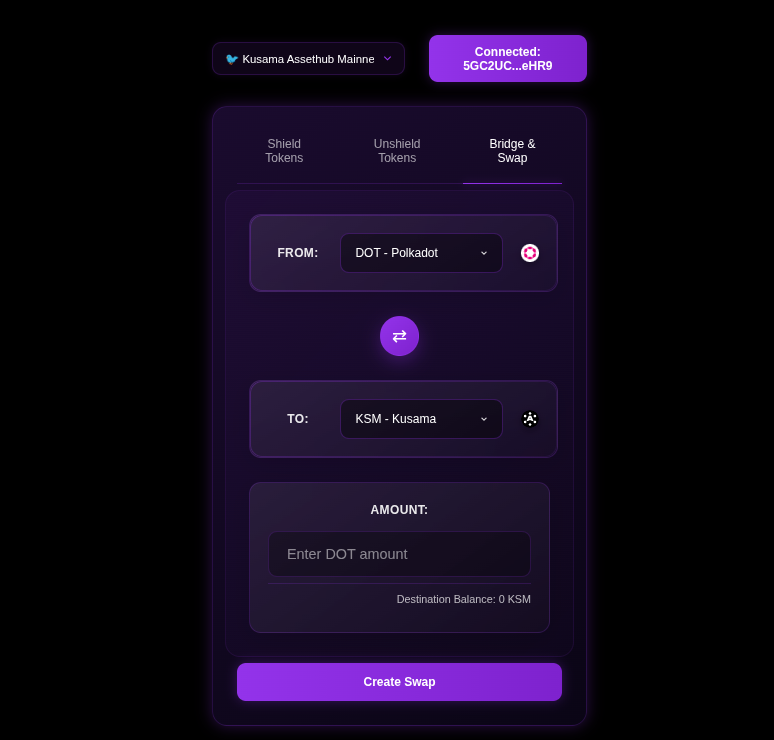
Bridge & Swap Interface:

Technical overview:
- 1: Swap DOT to KSM using Polkadot Assethub’s on-chain DEX
- 2: Send the KSM to Kusama Assethub using Snowbridge’s trustless bridge
Demo:
DOT Polkadot assethub to Kusama Assethub KSM
How to:
Step 1:
Connect your Talisman browser wallet and select your polkadot account. Make sure you have funds on Polkadot Assethub not regular Polkadot Relay chain.
Step 2:
Navigate to bridge tab and select the amount of DOT you want to swap. You will be able to preview the rate before the swap takes place.
Step 3:
Press swap and approve the transactions, Because Kusama Shield tries to be EVM compatible we ask the user to first select their Polkadot wallet then switch to the connected address to your talisman Ethereum account. This makes it much easier to be able to directly shield your KSM, once you have swapped them.
Step 4:
Shield your fresh KSM.
Other interfaces:
https://kheopswap.xyz/#/polkadot/swap
Snowbridge trustless bridge documentation
Cross-Chain Swap Guide
Kusama Shield provides low cost cross-chain swaps, allowing users to exchange DOT for a wide variety of digital assets across different blockchain networks. And send the DOT to Kusama Assethub to provide shielded KSM and more privacy.
Note: Kusama Shield has not been audited, proceed with care. Application assumes that you have connected a Talisman browser wallet.
Overview
The swap functionality enables you to:
- Convert DOT to/from 50+ different cryptocurrencies(on other l1 and l2 chains)
- Swap between major blockchains (Bitcoin, Ethereum, Solana, etc.)
- Track your swap status in real-time
- By utilizing the dotsend bot we are able to provide fast and lowcost(0.6% fee) swaps.
Demo:
Send USDT(trc20) from Tron, that the user has in Trust wallet to DOT.
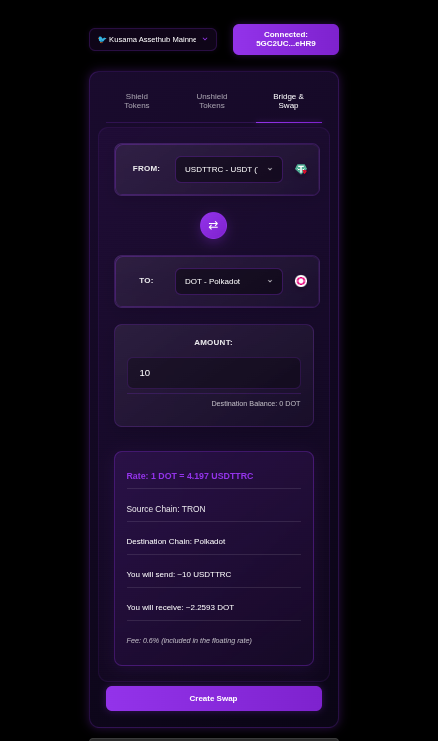
Bridge & Swap Interface:

How to Use Swaps
Note: Tested with chrome browser + Talisman wallet
1. Connect Your Wallet
- Click “Connect Wallet” in the interface
- Select your preferred Polkadot wallet (Talisman, Polkadot.js, SubWallet)
- Ensure your wallet contains DOT tokens
2. Navigate to Bridge & Swap
- Select the “Bridge & Swap” tab in the main interface
- This feature is available on Kusama AssetHub mainnet
3. Configure Your Swap
From Currency
- DOT is currently the primary source currency
- Enter the amount of DOT you want to swap
To Currency
Choose from 80+ available destination currencies including:
- Bitcoin Network: BTC, BTCLN (Lightning), BTCBSC
- Ethereum Network: ETH, ETHOP, ETHARBITRUM, ETHZKSYNC
- Stablecoins: USDT, USDTBSC, USDTMATIC, USDC, DAI
- Major Altcoins: ADA, SOL, AVAX, ATOM, APT, LINK
- DeFi Tokens: AAVE, UNI, CAKE, SUSHI
- And many more
Destination Address
- For DOT → KSM swaps: Uses your connected wallet address automatically
- For other destinations: Enter the destination address for the target network
- Important: Ensure the address format matches the destination blockchain
4. Review Exchange Rate
- The interface displays the current exchange rate
- Shows estimated amount you’ll receive
- Rates are fetched in real-time from the swap provider
5. Create Swap:
- Click “Create Swap” to initiate the process
- A QR code will be generated for the deposit address
- Copy the deposit address or scan the QR code with your wallet
6. Send Your DOT:
- Send the exact DOT amount to the provided deposit address
- Click “I’ve sent the DOT” once the transaction is broadcast
- Do not send more or less than the specified amount
7. Track Your Swap
The interface provides real-time status updates:
Status Stages
- NEW: Order created, waiting for your deposit
- PENDING: Deposit received, confirming on blockchain
- EXCHANGE: Funds confirmed, exchange in progress
- WITHDRAW: Sending tokens to your destination address
- DONE: Swap completed successfully
Transaction Details
- Deposit Transaction: Hash, amount, fees, confirmations
- Withdrawal Transaction: Hash, amount, fees, confirmations
- Destination Address: Where your tokens are being sent
- Time Tracking: Order creation, processing times, completion
8. Completion
- Receive confirmation when swap is complete
- Transaction hashes are provided for verification
- Tokens are sent to your specified destination address
Available Trading Pairs:
DOT to Other Cryptocurrencies (50+ pairs)
Bitcoin Networks:
- DOT → BTC (Bitcoin)
- DOT → BTCLN (Bitcoin Lightning)
- DOT → BTCBSC (Bitcoin on BSC)
- DOT → BCH (Bitcoin Cash)
Ethereum Ecosystem:
- DOT → ETH (Ethereum)
- DOT → ETHOP (Ethereum Optimism)
- DOT → ETHARBITRUM (Ethereum Arbitrum)
- DOT → ETHZKSYNC (Ethereum zkSync)
- DOT → ETHBASE (Ethereum Base)
Stablecoins:
- DOT → USDT (Tether)
- DOT → USDTBSC (Tether BSC)
- DOT → USDTMATIC (Tether Polygon)
- DOT → USDTARBITRUM (Tether Arbitrum)
- DOT → USDTSOL (Tether Solana)
- DOT → USDTTRC (Tether TRON)
- DOT → USDC (USD Coin)
- DOT → USDCBSC (USD Coin BSC)
- DOT → USDCARBITRUM (USD Coin Arbitrum)
- DOT → USDCSOL (USD Coin Solana)
- DOT → DAI (Dai)
- DOT → DAIBSC (Dai BSC)
- DOT → DAIMATIC (Dai Polygon)
- DOT → TUSD (TrueUSD)
- DOT → USDP (Pax Dollar)
Major Blockchains:
- DOT → KSM (Kusama) Special cross-chain route
- DOT → ADA (Cardano)
- DOT → SOL (Solana)
- DOT → AVAX (Avalanche)
- DOT → ATOM (Cosmos)
- DOT → APT (Aptos)
- DOT → SUI (Sui)
- DOT → TON (Toncoin)
- DOT → XRP (Ripple)
- DOT → LTC (Litecoin)
- DOT → DOGE (Dogecoin)
DeFi & Exchange Tokens:
- DOT → AAVE (Aave)
- DOT → LINK (Chainlink)
- DOT → UNI (Uniswap)
- DOT → CAKE (PancakeSwap)
- DOT → SHIB (Shiba Inu)
Privacy Coins:
- DOT → XMR (Monero)
- DOT → ZEC (Zcash)
- DOT → DASH (Dash)
Other Networks:
- DOT → TRX (TRON)
- DOT → VET (VeChain)
- DOT → XLM (Stellar)
- DOT → XTZ (Tezos)
- DOT → ETC (Ethereum Classic)
Cryptocurrencies to DOT (50+ pairs)
You can swap the following cryptocurrencies to DOT:
Bitcoin Networks:
- BTC → DOT (Bitcoin)
- BTCLN → DOT (Bitcoin Lightning)
- BTCBSC → DOT (Bitcoin on BSC)
- BCH → DOT (Bitcoin Cash)
Ethereum Ecosystem:
- ETH → DOT (Ethereum)
- ETHARBITRUM → DOT (Ethereum Arbitrum)
- ETHBASE → DOT (Ethereum Base)
- ETHBSC → DOT (Ethereum on BSC)
- ETHOP → DOT (Ethereum Optimism)
- ETHZKSYNC → DOT (Ethereum zkSync)
- WETHETH → DOT (Wrapped ETH)
- WETHARBITRUM → DOT (Wrapped ETH Arbitrum)
- WETHBASE → DOT (Wrapped ETH Base)
Stablecoins:
- USDT → DOT (Tether)
- USDTBSC → DOT (Tether BSC)
- USDTMATIC → DOT (Tether Polygon)
- USDTARBITRUM → DOT (Tether Arbitrum)
- USDTSOL → DOT (Tether Solana)
- USDTTRC → DOT (Tether TRON)
- USDCETH → DOT (USD Coin Ethereum)
- USDCBSC → DOT (USD Coin BSC)
- USDCARBITRUM → DOT (USD Coin Arbitrum)
- USDCMATIC → DOT (USD Coin Polygon)
- USDCSOL → DOT (USD Coin Solana)
- DAIBSC → DOT (Dai BSC)
- DAIETH → DOT (Dai Ethereum)
- TUSD → DOT (TrueUSD)
- USDP → DOT (Pax Dollar)
Major Blockchains:
- ADA → DOT (Cardano)
- SOL → DOT (Solana)
- WSOL → DOT (Wrapped Solana)
- AVAX → DOT (Avalanche)
- ATOM → DOT (Cosmos)
- APT → DOT (Aptos)
- TON → DOT (Toncoin)
- XRP → DOT (Ripple)
- LTC → DOT (Litecoin)
- DOGE → DOT (Dogecoin)
DeFi & Exchange Tokens:
- AAVEETH → DOT (Aave Ethereum)
- LINK → DOT (Chainlink)
- CAKE → DOT (PancakeSwap)
- SHIB → DOT (Shiba Inu)
- PEPEETH → DOT (Pepe Ethereum)
- PAXGETH → DOT (PAX Gold Ethereum)
- MANAETH → DOT (MANA Ethereum)
- ZRX → DOT (0x Protocol)
- BAT → DOT (Basic Attention Token)
Privacy & Alternative Coins:
- XMR → DOT (Monero) Privacy coin
- ZEC → DOT (Zcash)
- DASH → DOT (Dash)
- ETC → DOT (Ethereum Classic)
- VET → DOT (VeChain)
- XLM → DOT (Stellar)
- XTZ → DOT (Tezos)
Other Networks & Tokens:
- TRX → DOT (TRON)
- BTT → DOT (BitTorrent Token)
- POL → DOT (Polygon)
- POLETH → DOT (Polygon Ethereum)
- KCS → DOT (KuCoin Token)
- BNBOPBNB → DOT (BNB Optimism)
- WBNBBSC → DOT (Wrapped BNB BSC)
- TWTBSC → DOT (Trust Wallet Token BSC)
- BSC → DOT (Binance Smart Chain)
- S → DOT (Specialty token)
Total: 70+ cryptocurrencies can be swapped to DOT
Special Features
DOT ↔ KSM Cross-Chain Swaps
- Direct integration with Polkadot and Kusama
- Uses on-chain DEX for optimal rates
- Automatic address handling for connected wallets
- No manual destination address required
See previous page for DOT > KSM swaps
Smart Status Tracking
- Adaptive Polling: Faster updates during critical phases
- Visual Progress: Step-by-step progress indicators
- Copy Functions: Easy copying of transaction hashes and addresses
- Emergency Handling: Clear instructions if manual review needed
Important Notes
Before Swapping
- ✅ Verify destination address format matches the target blockchain
- ✅ Check minimum and maximum swap amounts
- ✅ Ensure you have enough DOT for the swap amount
- ✅ Double-check the exchange rate and expected output
During Swaps
- ⏱️ Send the exact amount shown - not more, not less
- ⏱️ Don’t send from exchange wallets (use personal wallets only)
- ⏱️ Keep the swap interface open to monitor progress
- ⏱️ Save transaction hashes for your records
- ⏱️ Keep in mind this is early(beta) software
After Completion
- 🔍 Verify receipt of tokens at destination address
- 🔍 Check transaction on destination blockchain explorer
- 🔍 Swap DOT to KSM and shield it for privacy
Troubleshooting
Emergency Status
If your swap enters “EMERGENCY” status:
- Don’t panic - this requires manual review
- Email: kusamashield@smokes.thc.org
- Include: Your order number (displayed in the interface)
- Response: Support will resolve issues quickly
Common Issues
- Wrong Address Format: Ensure destination address matches target blockchain
- Insufficient Funds: Verify you have enough DOT for the swap
- Network Delays: Blockchain congestion can cause delays
- Expired Orders: Complete swaps within the time limit
Support
- Documentation: https://kusamashield.codeberg.page
- Emergency Support: kusamashield[replace me with the digital cyber post a]smokes.thc.org
- Status Page: Monitor service status on the main interface
Technical Details
Supported Networks
- Polkadot Ecosystem: DOT, KSM parachains
- Bitcoin: BTC, Lightning Network, wrapped variants
- Ethereum: Mainnet, L2s (Arbitrum, Optimism, Base, zkSync)
- Alternative L1s: Solana, Avalanche, Cosmos, Cardano
- Other Networks: BSC, Polygon, TRON, and more
Integration
- External Partners: Established swap providers for other pairs
- Real-time APIs: Live rate fetching and status tracking
- Blockchain Monitoring: Multi-chain transaction confirmation
For the latest updates and additional information, visit the official Kusama Shield documentation and follow us on X.
Swap USDT on Tron
Swapping USDT(trc20) on Tron from Trust wallet to DOT in my talisman browser wallet.
Demo:
Video demo sending from Trust wallet
Try it today:
UI Customization
Overview
The Kusama Shield UI supports visual customization to personalize the privacy experience. Open the toolbox icon (gear icon) in the main interface to access all customization options. Changes apply immediately.
Available Modes
Rain Mode
Creates animated particle effects (rain/snow) across the screen with configurable particle count, size, and falling speed. You can also upload a custom image to use as particles. See Rain Mode Configuration for full details.
Flame Mode
Animated fire effects across the screen. Toggle on/off from the settings modal.
Toaster Mode
Classic flying toasters animation — a nostalgic screensaver-style effect across the interface. Toggle on/off from the settings modal.

Pony Mode
Little ponies gallop across your screen. Based on the browser ponies project. Brings small animated ponies that walk, run, and interact across the Kusama Shield interface. Toggle on/off from the settings modal.

Other Customizations
Background Color
Two color pickers let you customize the primary background (--bg-primary) and gradient color (--bg-gradient) of the interface. Set any hex color to match your preferences.
Privacy Dashboard
View pool composition, K-anonymity scores, and shielded pool statistics with an interactive D3.js sunburst chart. See Privacy Dashboard for full details.
Supported Modes
| Mode | Description |
|---|---|
| Rain | Configurable particle rain/snow with custom images |
| Flame | Animated fire effects |
| Toaster | Flying toasters screensaver animation |
| Pony | Galloping ponies (browser ponies project) |
| Background | Custom primary and gradient colors |
Rain Mode Configuration
Overview
Rain/Snow animation mode adds customizable particle effects to the Kusama Shield UI.

Settings
| Property | Range | Default | Description |
|---|---|---|---|
rainMode | boolean | false | Enable/disable rain effect |
particleCount | 10-200 | 100 | Number of particles on screen |
particleSize | 5-60px | 20 | Particle diameter in pixels |
fallingSpeed | 1-10 | 5 | Animation speed level |
Usage
// Enable rain mode
setRainMode(true);

// Set particle count to 50
setParticleCount(50);
Features
- Image Upload: Custom particle images (cropped to circular shape)
- Default Image:
toolbox.pngif no upload - Animation Types:
fall(top→bottom) orfloat(gentle up/down) - Live Preview: Shows animation in settings modal
Technical Details
- Particles use
position: fixed,z-index: 9999,pointer-events: none - CSS animations for GPU acceleration
- Uses
vhunits for full viewport coverage
Performance
- Maximum 200 particles to prevent performance issues
- Uses CSS animations (GPU accelerated)
pointer-events: noneensures no interaction interference
Privacy Dashboard
The Privacy Dashboard visualizes the composition of the shielded pool and helps you understand the privacy guarantees of your transactions.
Pool Composition Scanner
When you open the dashboard, it scans the V7 pool for all deposited assets:
- Queries
getEscrowBalance(asset)for native tokens and all known pallet assets - Runs in parallel batches of 25 — scanning hundreds of assets in seconds
- Shows live progress with per-asset identification
- Displays the total value locked and asset diversity
The scanner detects both native tokens (DOT, KSM, PAS) and pallet assets (USDC, USDT, and any asset registered on AssetHub).
Sunburst Chart
The pool composition is rendered as an interactive D3.js sunburst chart:
- Inner ring: Asset categories (native vs pallet assets)
- Outer ring: Individual assets with their amounts
- Hover: Shows asset name, amount, and percentage of pool
- Color: Each asset gets a distinct color for easy identification
Below the chart, a tabular view lists every asset with its symbol, balance, and decimals for precise inspection.
K-Anonymity
K-anonymity measures how many other deposits your transaction is “hiding among”:
\[ k = \text{number of unspent deposits in the pool} \]
A higher K-anonymity score means stronger privacy:
| K Score | Privacy Level |
|---|---|
| 1-5 | Low — few deposits to hide among |
| 5-20 | Moderate — some anonymity |
| 20-50 | Good — difficult to trace |
| 50+ | Strong — lost in the crowd |
The dashboard displays the current K-anonymity score based on the pool’s tree size. Each deposit and withdrawal changes the score, so check it before making large transactions.
How Pool Composition Affects Privacy
A diverse pool with many different assets and amounts provides better privacy than a pool dominated by a few large deposits:
- More assets → Harder to correlate deposit/withdrawal pairs by asset type
- More depositors → Higher K-anonymity
- Varied amounts → Amount-based heuristics become unreliable
- Frequent activity → Timing analysis becomes noisy
The sunburst chart helps you visually assess pool diversity at a glance.
Updating the Dashboard
The dashboard re-scans the pool every time you open it. For the most current view:
- Open the Privacy Guarantee Chart (click the chart icon)
- Wait for the scan to complete (progress bar shows status)
- Explore the sunburst chart and asset table
- Note the K-anonymity score before making deposits or withdrawals
Anonymous Email & Identity
Combine shielded transfers with anonymous email forwarding for fully private invoice payments.
Fake Name Generator
Generates a random identity with a matching email alias:
- Click the mustache icon in the interface
- A random first name and last name are drawn from wordlists
- An email alias is created:
<firstname>.<lastname>@metasploit.io - Enter your real email to receive forwarded messages
- A confirmation link is sent — click it to activate

Then confirm your anonymous identity:

Enter your real email to receive forwarded messages:

All emails sent to your alias are forwarded to your real address without revealing your identity to the sender.
How Email Forwarding Works
Sender → alias@metasploit.io → your-real@email.com
The forwarder strips identifying metadata. Combined with a shielded send, you can:
- Pay an invoice anonymously via the Send tab
- Provide your anonymous email alias as the contact
- Receive confirmations/receipts at your real email
Neither the recipient nor the payment processor can link the payment to your real identity.
Powered by the Haltman infrastructure.
Privacy Notes
- The fake name generator is purely for convenience — names are random and not tied to any identity
- Email forwarding preserves message content but strips sender IP and metadata
- For maximum privacy, use the email alias only with shielded transactions
- The wordlists are locally loaded — no server round-trip for name generation
Integrate Kusama Shield
Do you have a feature or integration request?
Open an issue here:
Do you have a token on Kusama Assethub that you want to show in the main UI?
This will be fixed in a soon to-come release, but for now, open an issue like above.
Do you want us to deploy Kusama Shield on another network?
Open an issue here:
Do you need something custom?
Email kusamashield at segfault dot net
Using @kusamashield/shielded-transfers V7 SDK
This guide covers the V7 SDK for Paseo, Polkadot, and Kusama AssetHub.
Library link: https://www.npmjs.com/package/@kusamashield/shielded-transfers
A step-by-step guide to depositing and withdrawing shielded tokens using the V7 pool and 8-signal ZK circuit.
Prerequisites
- Node.js 18+
- An AssetHub account with balance
- Circuit artifacts (included in the npm package)
localStoragepolyfill if running in Node.js (the SDK uses localStorage for Merkle tree caching)
1. Install
npm install @kusamashield/shielded-transfers@0.1.4 ethers
2. Copy Circuit Artifacts
The V7 WASM and proving key files need to be served. For a Node.js script, copy them to your project:
cp node_modules/@kusamashield/shielded-transfers/dist/withdraw_phase2_fixed_v7.wasm ./
cp node_modules/@kusamashield/shielded-transfers/dist/withdraw_phase2_fixed_v7_0001.zkey ./
For browser apps, these go in
public/so the library can fetch them viafetch().
3. Connect
import { ethers } from "ethers";
import { PASEO_CONFIG, POLKADOT_CONFIG, KUSAMA_CONFIG } from "@kusamashield/shielded-transfers";

const provider = new ethers.JsonRpcProvider(POLKADOT_CONFIG.rpcUrl);
const wallet = new ethers.Wallet("0xYOUR_PRIVATE_KEY", provider);
4. V7 Deposit
V7 uses depositNative(bytes32 commitment) — only the commitment is exposed, not the nullifierHash.
import { ZKPService, depositNativeV7 } from "@kusamashield/shielded-transfers";

const zk = new ZKPService();
const amount = ethers.parseEther("1.0");

const deposit = await depositNativeV7(wallet, poolAddress, amount);
// deposit contains: { commitment, secret, nullifier, nullifierHash, tx }
await deposit.tx.wait();
What happens:
- Generates random
secretandnullifier - Computes V7 commitment:
poseidon2([poseidon2([amount, 0]), poseidon2([nullifier, secret])]) - Calls
depositNative(commitment)on the V7 pool — nullifierHash is NOT sent - The contract emits
Deposit(address,bytes32)with only the asset and commitment
5. Build Merkle Tree
import { buildMerkleTreeFromContract, clearMerkleCache } from "@kusamashield/shielded-transfers";

clearMerkleCache(poolAddress);
const tree = await buildMerkleTreeFromContract(provider, poolAddress);
const leafIdx = tree.findLeafIndex(BigInt(deposit.commitment));
const proof = tree.getProof(leafIdx);
6. V7 Withdraw
V7 uses 8 public signals and requires a context hash for replay protection:
const BN254_R = 21888242871839275222246405745257275088548364400416034343698204186575808495617n;

function computeContextHash(address) {
  return BigInt(ethers.keccak256(ethers.solidityPacked(["address"], [address]))) % BN254_R;
}

const context = computeContextHash(wallet.address);

const { formattedCall, publicSignals } = await zk.generateV4WithdrawProof({
  withdrawnValue: amount.toString(),
  root: proof.root,
  treeDepth: "128",
  context: context.toString(),
  asset: "0",
  existingValue: amount.toString(),
  existingNullifier: deposit.nullifier,
  existingSecret: deposit.secret,
  newNullifier: zk.generateRandomNullifier().toString(),
  newSecret: zk.generateRandomSecret().toString(),
  siblings: proof.siblings,
  leafIndex: leafIdx.toString(),
}, wasmPath, zkeyPath);

// formattedCall = [pA, pB, pC] pre-formatted for Solidity
// pA: [bigint, bigint]
// pB: [[bigint, bigint], [bigint, bigint]] (transposed for Solidity)
// pC: [bigint, bigint]

const tx = await withdrawV7(wallet, poolAddress,
  formattedCall[0], formattedCall[1], formattedCall[2],
  publicSignals.map(BigInt), wallet.address);
await tx.wait();
7. V7 Proxy Withdraw
Route withdrawal through a proxy contract for extra sender unlinkability:
import { proxyWithdrawV7 } from "@kusamashield/shielded-transfers";

const tx = await proxyWithdrawV7(wallet, poolAddress,
  formattedCall[0], formattedCall[1], formattedCall[2],
  publicSignals.map(BigInt), recipientAddress);
await tx.wait();
The proxy withdraw deploys a fresh SimpleTokenForwarder contract per withdrawal, giving the recipient a unique sender address each time.
Complete Roundtrip Example (V7)
import { ethers } from "ethers";
import {
  ZKPService, depositNativeV7, withdrawV7,
  buildMerkleTreeFromContract, clearMerkleCache,
} from "@kusamashield/shielded-transfers";

const BN254_R = 21888242871839275222246405745257275088548364400416034343698204186575808495617n;

// localStorage polyfill for Node.js
global.localStorage = {
  _data: Object.create(null),
  getItem(k) { return this._data[k] ?? null; },
  setItem(k, v) { this._data[k] = v; },
  removeItem(k) { delete this._data[k]; },
  clear() { this._data = Object.create(null); },
  get length() { return Object.keys(this._data).length; },
  key(i) { return Object.keys(this._data)[i] ?? null; },
};

function computeContextHash(address) {
  return BigInt(ethers.keccak256(ethers.solidityPacked(["address"], [address]))) % BN254_R;
}

async function roundtrip() {
  const provider = new ethers.JsonRpcProvider(process.env.RPC_URL);
  const wallet = new ethers.Wallet(process.env.PRIVATE_KEY, provider);
  const pool = process.env.POOL_ADDRESS;
  const wasm = process.env.WASM_PATH || "./public/withdraw_phase2_fixed_v7.wasm";
  const zkey = process.env.ZKEY_PATH || "./public/withdraw_phase2_fixed_v7_0001.zkey";
  const zk = new ZKPService();

  // Deposit
  const amount = ethers.parseEther("0.01");
  const deposit = await depositNativeV7(wallet, pool, amount);
  await deposit.tx.wait();

  // Tree
  clearMerkleCache(pool);
  const tree = await buildMerkleTreeFromContract(provider, pool);
  const idx = tree.findLeafIndex(BigInt(deposit.commitment));
  const proof = tree.getProof(idx);

  // Proof
  const ctx = computeContextHash(wallet.address);
  const { formattedCall, publicSignals } = await zk.generateV4WithdrawProof({
    withdrawnValue: amount.toString(), root: proof.root,
    treeDepth: "128", context: ctx.toString(), asset: "0",
    existingValue: amount.toString(),
    existingNullifier: deposit.nullifier, existingSecret: deposit.secret,
    newNullifier: zk.generateRandomNullifier().toString(),
    newSecret: zk.generateRandomSecret().toString(),
    siblings: proof.siblings, leafIndex: idx.toString(),
  }, wasm, zkey);

  // Withdraw
  const tx = await withdrawV7(wallet, pool,
    formattedCall[0], formattedCall[1], formattedCall[2],
    publicSignals.map(BigInt), wallet.address);
  return tx.wait();
}
Pallet Assets (V7)
For non-native tokens (USDC, USDT, etc.):
import { depositAssetV7, getPalletAssetPrecompile } from "@kusamashield/shielded-transfers";

// Approve first, then deposit
const precompile = getPalletAssetPrecompile(assetId);
const token = new ethers.Contract(precompile, ERC20_ABI, wallet);
await token.approve(poolAddress, amount).then(tx => tx.wait());

const deposit = await depositAssetV7(wallet, poolAddress, assetId, amount, precompile);
await deposit.tx.wait();
Available Functions (V7)
| Function | Purpose |
|---|---|
depositNativeV7(signer, pool, amount, secret?, nullifier?) | Deposit native token |
depositAssetV7(signer, pool, assetId, amount, tokenAddr, secret?, nullifier?) | Deposit pallet asset |
withdrawV7(signer, pool, pA, pB, pC, pubSignals, recipient) | Withdraw (standard) |
proxyWithdrawV7(signer, pool, pA, pB, pC, pubSignals, recipient) | Withdraw (proxy) |
ZKPService.generateV4WithdrawProof(input, wasm, zkey) | Generate Groth16 proof (8 signals) |
ZKPService.generateRandomSecret() | Random Poseidon-compatible secret |
ZKPService.generateRandomNullifier() | Random Poseidon-compatible nullifier |
buildMerkleTreeFromContract(provider, pool) | Rebuild LeanIMT from on-chain events |
clearMerkleCache(pool) | Clear localStorage tree cache |
Chain Configurations (V7)
// Paseo AssetHub (V7)
PASEO_CONFIG: ChainConfig {
  contract: 0xbcE09D4De052b2816df1285663ac89528DF45380,
  verifier: 0xcA4cBc5d31eccd08d393C43aF492F729FF30b685,
  poseidon: 0x1d165f6fE5A30422E0E2140e91C8A9B800380637,
  treeDepth: 128,
  deploymentBlock: 11273491,
  rpcUrl: "https://paseo-assethub-rpc.laissez-faire.trade"
}

// Polkadot AssetHub (V7)
POLKADOT_CONFIG: ChainConfig {
  contract: 0x0D694Da746e73D1e255c1894F90e38170db45809,
  verifier: 0x6A13781E43AEA21918120CD0E7a2ed8614c01e14,
  poseidon: 0xB8F0C6679D6Cc56450470522Bd96573C3D615052,
  treeDepth: 128,
  deploymentBlock: 18460000,
  rpcUrl: "https://polkadot-assethub-rpc.laissez-faire.trade"
}

// Kusama AssetHub
KUSAMA_CONFIG: ChainConfig {
  contract: 0x625159459EB6C50C4F4b126A955B18d5c4DCA573,
  verifier: 0x66988131CFfd10d2804ffaC93Ac302D0886D7829,
  treeDepth: 254,
  deploymentBlock: 0,
  rpcUrl: "https://kusama-rpc.laissez-faire.trade"
}
V7 Public Signals (8 signals)
pubSignals = [
  newCommitmentHash,       // [0]
  existingNullifierHash,   // [1]
  contextHash,             // [2]
  withdrawnValue,          // [3]
  treeDepth,               // [4] = 128
  context,                 // [5]
  root,                    // [6]
  asset,                   // [7] precompile address for pallet assets, 0 for native
]
Gas Estimates (pallet-revive)
| Operation | Gas | Notes |
|---|---|---|
| Deposit (native) | ~45,000 | ~270x cheaper than Ethereum |
| Withdraw (standard) | ~7,000 | Groth16 verify + transfer |
| Withdraw (proxy) | ~120,000 | Includes proxy contract deployment |
Troubleshooting
siblings array must have exactly 128 elements— Tree depth must be 128. TheLeanIMT.getProof()pads automatically.Unknown root— Rebuild the tree from the deployment block. Wait for block confirmations after deposit.deposit already spent— Each nullifier can only be used once. Generate a fresh secret for each deposit.- Proof generation takes ~15s — Normal for snarkjs. Use rapidsnark (C++) for ~4.3s if available.
BN254_R modulus must be applied— The context hash requires% BN254_Ror the proof will fail.assetparameter — For V7 pallet assets, pass the precompile address (fromgetPalletAssetPrecompile(assetId)), not the numeric assetId.
Reference
- Library: codeberg.org/KusamaShield/shielded-transfers
- npm:
@kusamashield/shielded-transfers@0.1.4 - V7 Pool Spec: V7 Shielded Pool
- Network Reference: Network Reference
Python SDK
A Python library for interacting with the Kusama Shield V7 pool. Implements the same cryptographic primitives and Merkle tree logic as the Solidity contracts and TypeScript SDK.
Install
pip install shielded-transfers
Requires: Python 3.8+, web3>=6.0.0, eth-account>=0.9.0, light-poseidon-python>=0.1.3
Quick Start
from shielded_transfers import ShieldedClient
import json

client = ShieldedClient(
    rpc_url="https://polkadot-assethub-rpc.laissez-faire.trade",
    pool_address="0x0D694Da746e73D1e255c1894F90e38170db45809",
    private_key="0x_your_private_key",
    deployment_block=18460000,
)

# Check balances
wallet_bal, _ = client.get_balance()
pool_bal, _ = client.get_pool_balance()
print(f"Wallet: {wallet_bal}, Pool: {pool_bal}")

# Deposit 1 DOT
note = client.deposit(1 * 10**18)

# Save note securely
with open("deposit_note.json", "w") as f:
    json.dump(note, f)

# ... later ...

# Withdraw using saved note
with open("deposit_note.json") as f:
    note = json.load(f)

tx_hash = client.withdraw(note)
print(f"Withdraw TX: {tx_hash}")
Commitment Generation
from shielded_transfers import generate_commitment

note = generate_commitment(
    secret_hex="0x" + "a" * 62,  # 31 bytes
    amount_wei=1000000000000,     # 0.000001 DOT
    asset_id=0,
)

print(note["commitment"])   # public commitment
print(note["nullifier"])     # nullifier for proof
print(note["nullifier_hash"]) # double-spend prevention
Merkle Tree (LeanIMT)
from shielded_transfers import LeanIMT

tree = LeanIMT(depth=128)
tree.insert(leaf)                    # Insert leaf
proof = tree.get_proof(leaf_index)   # Get Merkle proof
index = tree.find_leaf_index(leaf)   # Find leaf position
root = tree.root                     # Current root
size = tree.size                     # Number of leaves
Network Configurations
from shielded_transfers import NETWORKS

POLKADOT = {
    "rpc": "https://polkadot-assethub-rpc.laissez-faire.trade",
    "pool": "0x0D694Da746e73D1e255c1894F90e38170db45809",
    "verifier": "0x6A13781E43AEA21918120CD0E7a2ed8614c01e14",
    "poseidon": "0xB8F0C6679D6Cc56450470522Bd96573C3D615052",
    "deployment_block": 18697500,
    "native_token": "DOT",
    "chain_id": 420420419,
}

PASEO = {
    "rpc": "https://paseo-assethub-rpc.laissez-faire.trade",
    "pool": "0xbcE09D4De052b2816df1285663ac89528DF45380",
    "verifier": "0xcA4cBc5d31eccd08d393C43aF492F729FF30b685",
    "poseidon": "0x1d165f6fE5A30422E0E2140e91C8A9B800380637",
    "deployment_block": 11273491,
    "native_token": "DOT",
    "chain_id": 420420421,
}

KUSAMA = {
    "rpc": "https://kusama-assethub-rpc.laissez-faire.trade",
    "pool": "0x625159459EB6C50C4F4b126A955B18d5c4DCA573",
    "deployment_block": 0,
    "native_token": "KSM",
    "chain_id": 420420418,
}
API Reference
ShieldedClient
client = ShieldedClient(
    rpc_url,             # RPC endpoint
    pool_address,        # Pool contract address
    private_key,         # Account private key
    deployment_block,    # Block pool was deployed
    native_token="DOT",  # Native token symbol
)
| Method | Returns | Description |
|---|---|---|
get_balance() | Tuple[int, str] | Wallet balance (wei, formatted) |
get_pool_balance() | Tuple[int, str] | Pool balance |
get_tree_size() | int | Merkle tree leaf count |
get_root() | int | Current tree root |
is_known_root(root) | bool | Root in 16-slot window |
deposit(amount_wei, asset_id=0) | Dict | Shielded deposit (returns note) |
build_tree(recent_blocks=0) | LeanIMT | Build tree from on-chain events |
withdraw(note, recipient=None) | str | Shielded withdrawal (returns tx hash) |
Error Handling
from shielded_transfers import (
    DepositError, WithdrawError, ProofError,
    PoseidonError, TreeError, CommitmentError,
)

try:
    note = client.deposit(amount)
except DepositError as e:
    print(f"Deposit failed: {e}")
except ProofError as e:
    print(f"ZK proof failed: {e}")
Performance
| Operation | Time |
|---|---|
| Proof generation | ~17s (snarkjs) / ~4.3s (rapidsnark) |
| Tree build (recent) | ~5s |
| Tree build (full) | ~30s |
| Total withdraw | ~25s |
Times measured on Raspberry Pi 5 (ARM64).
Source
- Package:
shielded-transferson PyPI - Poseidon backend:
light-poseidon-python(Rust, 2x faster than Node.js) - Repo: codeberg.org/KusamaShield/shielded-transfers-python
Kusama Shield Comparison to Tracked Protocols
Comparison of Kusama Shield against other privacy protocols in the ecosystem.
| Property | Kusama Shield | Privacy Pools | Railgun | Hinkal | Curvy | Fluidkey |
|---|---|---|---|---|---|---|
| Confidentiality | Yes | No | Yes | Yes | Partial | No |
| Anonymity | Yes | Linkability | Yes | Yes | Partial | Linkability |
| Asset Privacy | Yes | No | Partial | Partial | Partial | No |
| Plausible Deniability | No | No | No | No | No | Yes |
| Censorship Resistance | Yes(strong) | Yes (ragequit) | Yes | No | No | Yes |
| Compliance Gates | None | ASP (withdraw) | POI (app) | Chainalysis | Predicate | None |
| Client-side Proving | Yes | Yes | Yes | Optional/TEE | No | N/A |
| Partial Withdrawals | Yes | Yes | Yes | Yes | Yes | N/A |
| Implementation Maturity | 2: Testnet + Mainnet <1 year | 4: Mainnet 1+ yr | 5: Mainnet 2+ yr | 3: Mainnet <1 yr | 3: Mainnet <1 yr | 4: Mainnet 1+ yr |
Key Differentiators
Kusama Shield Advantages
- No compliance gates — fully permissionless withdrawals
- Strong censorship resistance — no centralized control points
- Full asset privacy — all shielded assets maintain confidentiality
- True anonymity set — unlinkable deposits/withdrawals
Implementation Notes
- Uses Groth16 ZK proofs (snarkjs)
- Merkle root is public input (must match on-chain tree) — unlike v4 where root is private
- Supports native tokens and pallet assets (ERC20-like)
- 128-depth LeanIMT tree (256 leaves max before upgrade)
Performance Benchmarks (PolkVM)
Powered by 30x customized Poseidon on PolkVM (Rust → PVM):
| Operation | Paseo Gas | Ethereum Gas | Improvement |
|---|---|---|---|
| Single Poseidon hash | 2,706 | 32,800 | 12x cheaper |
| Depth-20 Merkle path | 37,956 | 605,000 | 16x cheaper |
| Groth16 verification | 3,990 | 202,216 | 51x cheaper |
| Shielded pool deposit | ~45K ($0.19) | ~$54 | 270x cheaper |
| Shielded pool withdrawal | ~7K ($0.03) | ~$15 | ~500x cheaper |
Max Poseidon hashes per block: 39 (Solidity: 1, exceeds limit) Architecture: Solidity logic + Rust Poseidon + Groth16 verification
Reference
Protocol data and maturity ratings sourced from https://private-transfers.pse.dev/.
Offramp (USDC to Fiat)
Overview
Convert shielded USDC to fiat currency through the ZKP2P peer-to-peer protocol.

Architecture
- Source: Polkadot network (user sends DOT)
- Bridge: DOT → ETH (gas) and DOT → USDC (for offramp)
- Destination: Base network (for USDC offramp execution)
Flow
Step 1: Bridge DOT → ETH (for gas)
- Users send DOT to a deposit address
- Receive ETH on Base network for transaction fees
- Required if Base ETH balance < $1.5 equivalent
Step 2: Bridge DOT → USDC
- Users send DOT to receive USDC on Base
- Can use existing USDC balance on Base (skips this step)
- Rate estimation via
/exchange_rateendpoint
Step 3: Offramp USDC → Fiat
- Approve USDC spending on Base
- Create deposit with platform/payment details
- Order sent to ZKP2P orderbook for P2P fulfillment
Platforms
| Platform | Currencies |
|---|---|
| Cash App | USD |
| Chime | USD |
| Mercado Pago | ARS, BRL, MXN |
| Monzo | EUR, GBP |
| N26 | EUR |
| PayPal | Multiple fiat pairs |
| Revolut | EUR, GBP, USD |
| Venmo | USD |
| Wise | Multiple fiat pairs |
| Zelle | USD |
Supported Fiat Currencies
- ARS (Argentine Peso)
- AUD (Australian Dollar)
- CHF (Swiss Franc)
- EUR (Euro)
- GBP (British Pound)
- MXN (Mexican Peso)
- SGD (Singapore Dollar)
- THB (Thai Baht)
- USD (US Dollar)
Supported Assets
The offramp supports all pallet-assets on Polkadot and Kusama via the ERC20 precompile system.
Asset Precompile Addresses
Pallet assets use the precompile address format: 0x{assetIdHex}00000000000000000000000001200000
Common assets:
- USDC: Asset ID 1 (via precompile on Asset Hub)
- USDT: Asset ID varies by chain
- PSILV: Asset ID 50000867 on Paseo AssetHub
Asset Shielding
Use the @kusamashield/shielded-transfers library to shield assets before offramping:
// Shield PSILV on Paseo
const deposit = await shieldAssetPaseo(50000867, "100", wallet);

// Bridge to Base and offramp
// See integrate_sdk.md for withdrawal flow
Key Addresses
- USDC (Base):
0x833589fCD6eDb6E08f4c7C32D4f71b54bdA02913 - Offramp Contract:
0x777777779d229cdF3110e9de47943791c26300Ef - Base Chain ID: 8453
Troubleshooting
- Insufficient gas: Bridge DOT → ETH first
- Approval failure: Ensure USDC allowance for offramp contract
- Order expired: Complete within 10 minutes
- Network mismatch: Auto-switches to Base if needed
Video Demo
Watch the full video demo showing the complete offramp flow from DOT bridging to fiat withdrawal.
Deploy Kusama Shield Interface
Requirements:
Clone:
git clone https://codeberg.org/KusamaShield/Interface && cd Interface/
Build wasm:
cargo install wasm-pack
wasm-pack build --target web
rm -rf public/pkg/
cp -r pkg/ public/
Install node packages:
npm install -f
Run locally:

npm run local
Use
npm run devto run it on all public network interfaces
Run a public instance
You should run a public instance! We encourage everyone to do so.
git clone https://codeberg.org/KusamaShield/Interface
cd Interface/ && npm install -f
npm run build
Run:
npm run local
Put Kusama Shield behind a firewall
You are adviced to put the react interface behind a firewall such as:
- nginx + https://github.com/owasp-modsecurity/ModSecurity
- Coraza
Nginx setup example:
Modify vite.config.ts:
import react from '@vitejs/plugin-react'
import { defineConfig } from 'vite'
import path from 'path'
//import { NodeGlobalsPolyfillPlugin } from '@esbuild-plugins/node-globals-polyfill';

// https://vitejs.dev/config/
export default defineConfig({
  plugins: [react()],
  build: {
    target: 'esnext',
  },
  worker: {
    format: 'es',
  },
    // Cross-Origin-Isolation headers enable SharedArrayBuffer, which lets
  // snarkjs/ffjavascript use multi-threaded WASM for multiexponentiation.
  // Without these, groth16.prove() runs single-threaded (~40s → ~5-10s).
  server: {
port: 6666,  // Vite listens here (no root needed)

hmr: {
  protocol: 'wss',
  host: 'changethistoyourwebsite.com',
  // REMOVE THIS: port: 443,
  clientPort: 443,  // Browser connects here through nginx
},

allowedHosts: ['changethistoyourwebsite.com'],

	  headers: {
      'Cross-Origin-Opener-Policy': 'same-origin',
      'Cross-Origin-Embedder-Policy': 'require-corp',
    },
  },
  preview: {
    headers: {
      'Cross-Origin-Opener-Policy': 'same-origin',
      'Cross-Origin-Embedder-Policy': 'require-corp',
    },
  },
  assetsInclude: ['**/*.wasm'],
  optimizeDeps: {
    include: ['dayjs', 'dayjs/plugin/relativeTime', 'dayjs/locale/en'],
  },
})
Add it to nginx:
#cat /etc/nginx/sites-available/mywebsite

server {
#    listen 80;
    server_name mywebsite;

    location / {
        proxy_pass http://localhost:6666;
        # Or serve static files: root /path/to/your/static/files;
        # Add other directives as needed.
        proxy_http_version 1.1;

        # WebSocket support
        proxy_set_header Upgrade $http_upgrade;
        proxy_set_header Connection "upgrade";

        proxy_set_header Host $host;
        proxy_set_header X-Real-IP $remote_addr;
        proxy_set_header X-Forwarded-For $proxy_add_x_forwarded_for;
        proxy_set_header X-Forwarded-Proto $scheme;

    }

    listen 443 ssl; # managed by Certbot
    ssl_certificate /etc/letsencrypt/live/mywebsite/fullchain.pem; # managed by Certbot
    ssl_certificate_key /etc/letsencrypt/live/mywebsite/privkey.pem; # managed by Certbot
    include /etc/letsencrypt/options-ssl-nginx.conf; # managed by Certbot
    ssl_dhparam /etc/letsencrypt/ssl-dhparams.pem; # managed by Certbot

}

server {

   if ($host = mywebsite) {
       return 301 https://$host$request_uri;
   } # managed by Certbot


   listen 80;
   server_name mywebsite;
   return 404; # managed by Certbot
    access_log /var/log/nginx/xapiaccess.log;

}
Replace mywebsite with my domain and grab a free tls(https) certificate with certbot:
https://certbot.eff.org/instructions
Run with IPFS:
Note: Most ipfs gateways block wasm via the http headers which is a problem for all WASM sites being served over IPFS.
Build project:
npm run build
ipfs add -r dist/
IPFS links:
https://ipfs.github.io/public-gateway-checker/
Run with Docker or Podman
A public docker image of the interface is avaliable here:
https://hub.docker.com/r/kusamashield/interface
Run with podman:
Podman is a great alternative to docker that does not require root to run.
Using one command you can run the Kusama Shield interface locally.
podman run -p 5173:5173 docker.io/kusamashield/interface:v0.1
now open your browser and visit: http://localhost:5173
Run with docker:
Pull image:
docker pull kusamashield/interface:v0.1
Run:
docker run -p 5173:5173 kusamashield/interface:v0.1
References:
https://podman.io/
https://hub.docker.com/
Operator guide
Host Kusama Shield UI instances
Best pratice:
- Own your own hardware
- Always respond to abuse requests with a link to the terms of service, ideally within 24hours
- Keep your systems up to date and happy.
- use ssh public key authentication
- Put Kusama Shield react app behind a proxy
- Always keep a good social relationship with your ISP.
Use your own hardware:
Buying a used server on ebay and asking your local data center or a datacenter nearby for a one unit rack slot, is a great and cost effective way to actually own your own hardware and have more control. Colocation costs are different depending on where(you can also ship your server somewhere cheaper) but for a single unit server your looking at 30-80Euro’s a month for the European market. The most price effective way to is often to ask local datacenters or maybe you nknow someone working for a company that has server racks?.
Host using a VPS:
Select a VPS provider, ideally one from Tor’s recommended providers | Good Bad ISPs.
Operator Guide - Terms of Service
By hosting an instance and/or using Kusama Shield you agree to the following Terms of Service:
Terms of Service
1. Acceptance of Terms
By accessing and using Kusama Shield, you agree to be bound by these Terms of Service and all applicable laws and regulations.
2. Service Description
Kusama Shield provides a privacy-focused Zero Knowledge token shielding User Interface that allows users to shield and unshield tokens on supported decentralized networks.
3. User Responsibilities
- You are responsible for maintaining the security of your wallet and secret keys
- You must ensure you have sufficient funds for transactions
- Developers and Operators of this website are not liable for any type of Regulatory actions or legal consequences arising from the use of the Platform
- You are responsible for verifying transaction details before confirming
4. Risk Disclosure
- Kusama Shield comes with no warranty
- Cryptocurrency transactions are irreversible
- Kusama Shield is early stage open source software and may contain bugs
- You acknowledge the risks associated with blockchain technology
- The service is provided “as is” without warranties
5. Privacy
- We do not store your private keys or transaction secrets
- This platform does not guarantee anonymity
- All transactions are processed by decentralized blockchain networks without any middlemen
- We do not process transactions or hold any private keys
- The Pool utilizes zero-knowledge proofs to verify transactions and asset holdings without revealing underlying data
- As a host of this website, I do not select the material transmitted through this website that I run, and I have no practical means of either identifying the source of such material or preventing its transmission
- No userdata is ever stored at the host of the Kusama Shield UI
6. Prohibited Use
Users must not:
- Use the Platform for illegal activities (e.g., money laundering, terrorism financing)
- Exploit vulnerabilities, disrupt hosting or engage in attacks against the Platform
- Misrepresent affiliation with the Platform’s developers or operators
- Violate applicable laws in their jurisdiction
7. Limitation of Liability
We are not liable for any losses, including but not limited to:
- Lost or stolen secret keys
- Network issues or blockchain congestion
- Incorrect transaction parameters
Developers and maintainers are not financial advisors or custodians of user funds.
Acceptance of Terms
By using the Platform, you confirm that you:
- Understand the risks of decentralized networks and privacy tools
- Assume full responsibility for your interactions with the Platform
- Release all maintainers, operators, and developers from liability
Disclaimer: This document is not legal advice. Consult a qualified attorney for compliance matters.
XCM Transfers
Send token transfers to and from other chains using XCM.
Kusama Shield is deployed on Paseo Hub chain
Supported Chains:
- Paseo Relay
- Paseo Assethub
- Paseo Hub
- Paseo Hydration
- Paseo Pop
Bridge:

1: Connect wallet
Connect your browser wallet and select a substrate/polkadot address.
2: Select to and from chain
Make sure you have funds on your account, use the faucet if needed:
faucet.polkadot.io
3: Press bridge
Tested xcm asset sending routes:
Paseo Relay:
- Relay > Assethub
- Relay > Paseo hub
- Relay > Paseo Hydration
Unstable route, do not use - Relay > Paseo Pop
Unstable XCM channel
Paseo Assethub:
- Assethub > Relay
- Assethub > Paseo hub
No XCM channel open right now. See more here - Assethub > Hydration
- Assethub > Paseo Pop
Polkadot.js Apps Chain link
Paseo Hub:
- Hub > Relay
- Hub > Assethub No supported channel.
- Hub > Hydration
No open supported XCM channel. - Hub > Paseo Pop
No open supported XCM channel. Polkadot.js App Chain link
Kusama Shield Roadmap 2026
Feature list for 2026 Privacy features to enhance and support the next generation of shielded pools.
Q1
- ✅ Extended UI + testing Testing suit for the interface
- ✅ Balance checks and block explorer support
- ✅ Metamask and wallet connect support Support for the major EVM browser wallets
- ✅ Privacy Dashboard with K-anonymity scores Answering the question: How private is my transaction?
- ✅ Proxy withdrawals Ability to withdraw tokens from the shielded pool via a new address
Q2
- ✅ Smart contract user simulator on Paseo
- ✅ Zero Knowledge logic moved from Solidity into PolkaVM LeanIMT and more Rust RISC-V optimized features. PolkaVM programs extended scope.
- ✅ Massive user documentation and examples Documentation for 40+ different L1 assets, how they can utilize Kusama Shield.
- ✅ V7 circuits deployed (Paseo + Polkadot) 8 public signals, linkability fix, known-roots window
- ✅ Shielded cross-currency sends (DOT→BTC/ETH/SOL/70+ currencies)
- ✅ Anonymous email forwarding
- ✅ UI theme modes (Rain, Flame, Toaster, Pony)
- ✅ Rust Poseidon on PolkaVM (17.7x cheaper gas than Solidity)
- ✅
@kusamashield/shielded-transfersSDK v0.1.4 - ✅ Polkadot AssetHub mainnet support
- ✅ rapidsnark proof generation (~4.3s)
- ✅ Tor/proxy support
- ✅ Public RPCs at laissez-faire.trade
Implementation of extended features and patches of bugs + readjustment of some of the zk logic (especially the merkle tree)
Kohaku integration
 We want to integrate Kusama Shield directly into Kohaku, making it easy for future applications to integrate. We aim to make Kusama Shield the best Kohaku integration and submit an integration or once past audit https://github.com/ethereum/kohaku
Why is Kohaku important?
Kohaku aims to cater to dapp developers, making it easy to provide shielded transfers.
Q3 - Going stable
-
☐ Audit Audit of smart contracts contracts, write up and audit report publishing by ZK expert.
-
☐ Support for a lot of Assets by default
-
☐ Bring your own assets (ability to just paste in a Kusama AH asset address)
-
☐ IPFS UI fork button (deploy a new version of the UI by the click of a button)
-
☐ Ability for smart contract to withdraw asset directly to parachains via XCM precompiles
Do you have features you want to see in Kusama Shield?
Open a codeberg issue here: https://codeberg.org/KusamaShield/Interface/issues.
Extra features that will be added:
- ISMP integration

- Non custodial (KYC-free) offramps Non custodial Offramps in the main UI
- Yielding Shielded Pools Earn rewards for shielding your tokens
Contribute to Kusama Shield
No matter if you are technical or not, you can help us spread awareness of Kusama Shield and Privacy!
For relatively fast support, email: kusamashield@segfault.net
Can I contribute to Kusama Shield Anonymously?
Yes! We are using codeberg for exactly this reason. Anyone can use the tor browser, sign up fast and contribute to Kusama Shield at codeberg.org/kusamashield.
Host an instance
If you have experience hosting or/and as a system administrator, we encourage you to host a public instance of Kusama Shield. Let us know and we will share it and link it here on the wiki.
Dealing with Abuse complaints
 Pattern trolls, legal staff and automated systems may, like any other website, send you takedown and/or abuse requests. If you recieve an email like the above, you are adviced to reply(IDEALLY NOT FROM YOUR PERSON ACCOUNT BUT FROM A GENERIC ONE, so its better pratice to reply from a legal@mydomain rather than nameofperson@domain) with a link to the Terms of Service. Which can be found at the end of all pages in the Kusama Shield UI.
As a hosting provider you do not handle custody over any assets and all you are hosting is a way to interact with a decentralized system, do not let pattern trolls scare you into taking the site down.
Pattern trolls, legal staff and automated systems may, like any other website, send you takedown and/or abuse requests. If you recieve an email like the above, you are adviced to reply(IDEALLY NOT FROM YOUR PERSON ACCOUNT BUT FROM A GENERIC ONE, so its better pratice to reply from a legal@mydomain rather than nameofperson@domain) with a link to the Terms of Service. Which can be found at the end of all pages in the Kusama Shield UI.
As a hosting provider you do not handle custody over any assets and all you are hosting is a way to interact with a decentralized system, do not let pattern trolls scare you into taking the site down.
Host as a tor hidden service:
Spinning up a .onion address for your instance is a fast way to add an extra layer of privacy.
Note:
This torrc file will change depending on your operating system.
when running the application as a tor hidden service, its important that you bind only the local interface, so when starting the app run npm run local not npm run dev
/etc/tor/torrc
We will tell tor to listen on port 80 and forward all requests to our local instance:
HiddenServiceDir /var/lib/tor/shield/
HiddenServicePort 80 127.0.0.1:5173
Restart tor and you will find the domain in the /var/lib/tor/shield/hostname file:
cat /var/lib/tor/other_hidden_service/hostname
aj4giwh2mu2n77f2ji22pqp7lbk2qmz2uhcafnz5oefnwbwfb22zniyd.onion
Grab the domain and try it either with adding .to and pasting it in your browser or by using torsocks and curl:
torsocks curl -v aj4giwh2mu2n77f2ji22pqp7lbk2qmz2uhcafnz5oefnwbwfb22zniyd.onion
Can you connect? if everything is good you can share your .onion publicly!
If you are renting a VPS and only want to host a tor instance, we recommend that you scan your VPS IP with nmap to make sure nothing extra is running on any port:
nmap -sC -sV -p- SERVERIPGOESHERE
If you see a strange port open, on linux you can login and check which process is listening:
lsof -i | grep THEPORTNUMBERGOESHERE
Help out with documentation
Fix spelling mistakes, improve our documentation. Help more people understand Kusama Shield by translating documentation.
testing the software and reporting bugs
Spread the word about Kusama Shield
Talk about Kusama Shield, spread the word, advocate for privacy
Guerilla Marketing
Promote Kusama Shield by:
- Writing articles/blog posts
- Showing demo’s
- Spreading the word
- Creating designs/images/videos/meme’s
Print Kusama Shield merch

Previous we have printed out holographic stickers, this is fun and low cost option to spread awareness of Privacy and Kusama Shield.
You can find the designs for the stickers here:
codeberg.org/KusamaShield/Graphics
Kusama Privacy
Kusama Network is pushing towards being the home for resilient privacy applications. By utilizing Zero Knowledge and Kusama Assethub smart contract platform, we can build true resilient apps.

Kusama Governance:
Projects can utilize funding from Kusama’s treasury by the power of opengov.
kusama.polkassembly.io
kusama.subsquare.io
Good papers on privacy:
Ring signatures/How to Leak a Secret
Zerocoin: Anonymous Distributed E-Cash from Bitcoin
Zexe: Decentralized Private Computation
Useful Zero Knowledge links:
Halo2 Hero course
0xparc
Zero Knowledge with Anna Rose podcast
zk-kit from PSE
Poseidon hashing in PolkaVM
Circom ZK toolkit
Noir ZK DSL
Get started with building on kusama today:
- Kusama.network
- Zero Knowledge groth16 program on Kusama Assethub example
- polkavm rust program example
Privacy projects on Kusama:
- Shield.markets
- Todo add more
Public Kusama Privacy Chat
Join the public kusama privacy chat group and productively contribute to brining more privacy to kusama:
https://matrix.to/#/#privacyinthebirdnest:matrix.org
Network Reference
Quick reference for all active Kusama Shield contract deployments.
Active Deployments
Polkadot AssetHub — Mainnet (420420419)
| Contract | Address |
|---|---|
| Shield Pool V7 | 0x0D694Da746e73D1e255c1894F90e38170db45809 |
| ZK Verifier | 0x6A13781E43AEA21918120CD0E7a2ed8614c01e14 |
| Poseidon Hasher | 0xB8F0C6679D6Cc56450470522Bd96573C3D615052 |
| Deployment Block | 18460000 |
Paseo AssetHub — Testnet (420420417)
| Contract | Address |
|---|---|
| Shield Pool V7 | 0xbcE09D4De052b2816df1285663ac89528DF45380 |
| ZK Verifier | 0xcA4cBc5d31eccd08d393C43aF492F729FF30b685 |
| Poseidon Hasher | 0x1d165f6fE5A30422E0E2140e91C8A9B800380637 |
| Deployment Block | 11273491 |
Kusama AssetHub — Mainnet (420420418)
| Contract | Address |
|---|---|
| Shield Pool V5 | 0x625159459EB6C50C4F4b126A955B18d5c4DCA573 |
| ZK Verifier | 0x66988131CFfd10d2804ffaC93Ac302D0886D7829 |
| Deployment Block | 0 |
RPC Endpoints
| Network | HTTP (EVM) | WSS (Substrate) |
|---|---|---|
| Polkadot AH | https://polkadot-assethub-rpc.laissez-faire.trade | wss://asset-hub-polkadot-rpc.polkadot.io |
| Polkadot AH (alt) | https://eth-rpc.polkadot.io/ | — |
| Paseo AH | https://paseo-assethub-rpc.laissez-faire.trade | wss://asset-hub-paseo-rpc.n.dwellir.com |
| Kusama AH | https://kusama-rpc.laissez-faire.trade | wss://kusama-asset-hub-rpc.polkadot.io |
| Kusama AH (alt) | https://eth-rpc-kusama.polkadot.io/ | — |
Block Explorers
| Network | URL |
|---|---|
| Polkadot AH | https://blockscout.polkadot.io/ |
| Paseo AH | https://testnet.routescan.io/ |
| Kusama AH | https://blockscout-kusama.polkadot.io/ |
V7 ABI Reference
// Deposit
function depositNative(bytes32 commitment) external payable
function depositAsset(uint256 assetId, uint256 amount, bytes32 commitment) external
function depositAssetDirect(uint256 assetId, uint256 amount, bytes32 commitment) external

// Withdraw
function withdraw(uint256[2] pA, uint256[2][2] pB, uint256[2] pC, uint[8] pubSignals, address recipient) external
function proxy_withdraw(uint256[2] pA, uint256[2][2] pB, uint256[2] pC, uint[8] pubSignals, address recipient) external

// Queries
function currentRoot() external view returns (uint256)
function treeSize() external view returns (uint256)
function getEscrowBalance(address) external view returns (uint256)
function isNullifierSpent(bytes32) external view returns (bool)
function isKnownRoot(uint256) external view returns (bool)
function verifier() external view returns (address)

// Events
event Deposit(address indexed asset, bytes32 commitment)
V7 Public Signals
pubSignals = [
  newCommitmentHash,       // [0] Change commitment in tree
  existingNullifierHash,   // [1] Marks spent deposit
  contextHash,             // [2] Replay protection
  withdrawnValue,          // [3] Amount withdrawn
  treeDepth,               // [4] = 128
  context,                 // [5] Chain-specific binding
  root,                    // [6] Merkle tree root
  asset,                   // [7] Asset precompile address
]
Proof Format (Groth16)
// pi_a: [bigint, bigint]                              — 2 elements
// pi_b: [[bigint, bigint], [bigint, bigint]]          — 2×2, transposed for Solidity
// pi_c: [bigint, bigint]                              — 2 elements
The pi_b matrix is transposed — [[b[0][1], b[0][0]], [b[1][1], b[1][0]]] — matching the snarkJS Solidity verifier convention.
Circuit Artifacts
| File | Purpose |
|---|---|
withdraw_phase2_fixed_v7.wasm | Witness calculator |
withdraw_phase2_fixed_v7_0001.zkey | Proving key |
withdraw_phase2_fixed_v7.circom | Circuit source |
Deprecated Addresses
These addresses are no longer in use — do not interact with them:
| Contract | Address | Issue |
|---|---|---|
| Old Polkadot Pool | 0x6f54d64C5619363722e4D1E4E53176F7f2FD57bf | Used incompatible bn254_x5 hasher |
| Old Polkadot Hasher | 0x66988131CFfd10d2804ffaC93Ac302D0886D7829 | Mismatched ZK circuit constants |
| Old Paseo Pool (V3) | 0x3099889C1538f0200B831181cbfb532a4e9A418F | Pre-V7 circuit |
BN254 Field Modulus
21888242871839275222246405745257275088548364400416034343698204186575808495617
All Poseidon hashing, Merkle tree arithmetic, and Groth16 proofs operate in this field.
SDK
npm install @kusamashield/shielded-transfers@0.1.4
See Integrate via the SDK for usage instructions.
Release Log
v55 — July 2026
Less Trust, More Truth. Privacy by design.
New Features
Shielded Send
Anonymous multi-chain invoice payer. Pay any invoice privately by routing funds through the V7 shielded pool. Supports DOT→DOT same-token transfers and DOT→ANY cross-currency transfers to 70+ assets (BTC, ETH, SOL, and more). Includes live exchange rate display, gas estimation with real Poseidon commitments, and async withdrawal flow with progress polling.
V7 Shielded Pool
Next-generation zero-knowledge privacy pool with 8 public signals, linkability fix (no deposits[] mapping), known-roots window (16 slots), and proxy withdrawals for extra sender unlinkability. Deployed on Paseo testnet and Polkadot mainnet.
Proxy Withdrawals
Route withdrawals through a fresh proxy contract for unique sender addresses every time. Toggleable in the UI for an extra layer of unlinkability.
Anonymous Email & Identity
Fake Name Generator with random identity creation and email forwarding via @metasploit.io aliases. Combine with shielded send for fully anonymous invoice payments — recipient sees only your alias.
Privacy Dashboard
Interactive D3.js sunburst chart showing pool composition by asset. Parallel asset scanner queries escrow(address) for all pallet assets, with live progress and K-anonymity score display.
UI Theme Modes
Four animated modes accessible from the toolbox settings modal:
- Rain Mode — Configurable particle effects (rain/snow) with custom image upload
- Flame Mode — Animated fire effects
- Toaster Mode — Flying toasters screensaver animation
- Pony Mode — Galloping ponies based on the browser ponies project
Plus customizable background colors (primary and gradient).
Polkadot AssetHub Mainnet Support
Full V7 deployment on Polkadot AssetHub (chain 420420419) with circomlibjs-compatible Poseidon hasher, verified end-to-end deposit→withdraw flow.
Non-KYC Offramps
Convert shielded USDC to fiat via the ZKP2P peer-to-peer protocol. Supports 10 platforms (Cash App, PayPal, Revolut, Wise, Venmo, Zelle, and more) across 9 fiat currencies.
SDKs & Tooling
@kusamashield/shielded-transfers v0.1.4 (TypeScript)
V7 support with depositNativeV7, withdrawV7, proxyWithdrawV7, ZKPService.generateV4WithdrawProof (8 public signals), and buildMerkleTreeFromContract. Supports Paseo, Polkadot, and Kusama AssetHub.
shielded-transfers (Python)
Python SDK for shielded pool operations with ShieldedClient, LeanIMT, commitment generation, and network configs. Uses light-poseidon-python (Rust backend) for 2x faster Poseidon hashing.
light-poseidon-python v0.1.5
Pure Python Poseidon hash bindings backed by Rust light-poseidon. circomlibjs-compatible constants. No Node.js dependency. 2x faster than circomlibjs.
PoseidonPolkaVM
Fastest on-chain Poseidon implementation in the world — Rust compiled to PolkaVM. 17.7x cheaper gas than Solidity Poseidon on pallet-revive. Enables depth-20 Merkle tree operations in a single block.
Infrastructure
New Public RPCs
https://polkadot-assethub-rpc.laissez-faire.trade
https://paseo-assethub-rpc.laissez-faire.trade
https://kusama-rpc.laissez-faire.trade
rapidsnark Proof Generation
C++ Groth16 prover on the backend — ~4.3s proof time vs ~15s with snarkjs (3.5x faster).
Tor & Proxy Support
Interface supports Tor and proxy connections for enhanced network privacy.
Backend Proxy
Async pool withdrawal API with background ZK proof generation, Merkle tree syncing (polling every 2s), SS58 address forwarding, known-roots retry logic, and smoldot light client integration.
Security & Protocol
- ~270x cheaper than equivalent operations on Ethereum mainnet
- Groth16 verification: 3,990 gas ($0.017) on pallet-revive
- Shielded pool deposit:
45K gas ($0.19), withdrawal:7K gas ($0.03) - V7 linkability fix: nullifierHash never exposed at deposit time
- Known-roots window: 16-slot buffer prevents griefing attacks
- Context hash replay protection:
keccak256(address) % BN254_R
Deprecations
- Moonbase testnet — no longer maintained
- Westend testnet — deprecated
- Old Polkadot Poseidon hasher (
0x66988131...) — bn254_x5 constants incompatible with ZK circuit
Contract Deployments
| Network | Pool | Verifier | Poseidon |
|---|---|---|---|
| Polkadot AH | 0x0D694Da7... | 0x6A13781E... | 0xB8F0C66... |
| Paseo AH | 0xbcE09D4D... | 0xcA4cBc5d... | 0x1d165f6f... |
| Kusama AH | 0x62515945... | 0x66988131... | — |
Source Code
Codeberg: codeberg.org/KusamaShield GitHub: github.com/kusamashield Mirror: ecliptic.shield.markets/KusamaShield